Showing posts with label layout. Show all posts

Tuesday, December 10, 2013

LayOut Open Pandora Port

Sebastian is working on a port of LayOut to the Pandora handheld. I didn't expect to see the editor ported to a handheld before anything else! Imagine, you'll be able to design and play OutRun levels whilst on the train to work. Here are some screenshots:


Grab it from here.

The forums were recently reset, so sadly a few posts were lost. They're back up and running now though. Be sure to checkout this cool CannonBall cabinet project from Mart, using an old Monaco GP cabinet he's salvaged from inevitable scrap!


Tuesday, November 26, 2013

LayOut 0.11 - First Track & Source Code Release

Supper has created a track with LayOut and it plays quite nicely for a first attempt. You can try the track using the latest CannonBall from the command line:

cannonball -file test.bin (where test.bin is the name of the LayOut track to load) 
Head over to the forums to check it out.


I also released a new version of LayOut with some minor bug fixes for issues raised here. 

The source code has also been added to github here. I'll add some compilation instructions when I have time. Please note that for now I've only tested with MSVC 2010 and Qt 5.1, so it probably won't compile on other platforms out of the box yet. 

Sunday, November 17, 2013

LayOut 0.1: A Track Editor for OutRun

LayOut: A Track Editor For OutRun
It's finally here. Create your own OutRun tracks and edit the original ones.

Features:
  • Track Editing: Create your own OutRun tracks from scratch
  • Import: Edit original OutRun tracks and supporting data
  • Scenery Pattern editor
  • Height Pattern editor
  • Road, Sky & Ground Palette editing
  • Realtime Preview
  • Export and play tracks using CannonBall.
  • Export to original arcade ROMs coming soon.

Download LayOut here.

You will also need the latest version of CannonBall.
You will definitely need to read the manual. And I'd welcome input to make the manual clearer. 

New Forum:
There's a new forum here.
Hopefully this will be a more useful place to post tracks, report bugs and ask questions than the blog comments. Thanks to Steve (Tipus4u) for volunteering to set this up and provide the hosting.

What's Next? 
I'll focus on LayOut support and fixing the inevitable bugs that will be found. However, I need to take a break from LayOut in terms of implementing new features for a short period. I have an exciting hardware/software project planned that I'm working on with Colin from the Jamma+ forums. I'll post some details on that in due course. 


Wednesday, October 23, 2013

LayOut - Complete Level Video

Here's a video showing a (not very playable) level I made whilst testing and bug fixing.


Click here to watch at full quality on youtube.

Wednesday, October 16, 2013

October Update

Things are really coming together now. It's possible to make a level that's more varied and interesting than most of those found in the original game. You can quickly export to CannonBall with a single button click and be playing instantly.


I coded some handy routines to quickly generate your own sky palette and ground palette, interpolating between two colours. Here's an example I generated in just 15 seconds.


I improved the interface and usability in certain areas as well, including the addition of zoom to the top-down road view.

At the moment I'm not really coding anything that interesting. I'm basically making a level and fixing any small bugs I encounter along the way. There are lots of minor bugs that arise in an application this complex and they take time to fix.

At the end of October I'm going to feature freeze completely. In November, I'll write the documentation, packaging the accompanying release of CannonBall and preparing for release. I'm excited at the prospect at releasing this thing.

In the meantime, check out this great article (in French) regarding unauthorized advertising in arcade games. It makes use of the System 16 Sprite Viewer I posted some time ago. 

Friday, September 20, 2013

OutRun Anniversary Update

It's the 27th anniversary of OutRun and we're long overdue a post about what I've been upto. Things may have seemed quiet, but that's only because I've been working intensely on LayOut behind the scenes. I say intensely, but as I'm married, 33 years old and have a full-time job in the games industry, finding spare time to program can be a luxury!

Excuses aside, yes, I thought I'd finish this project sooner. It would have been great to release LayOut for the anniversary. However, during development I came to the realisation that producing an editor people loved was more important to me than simply releasing a rushed product. And this is a hobby, so it's important that I love working on it myself.

Along the way, the feature set has ballooned beyond what I originally planned and LayOut, whilst imperfect in many ways, is greater than ever imagined. Let’s consider the features so far:


Realtime Level Preview
Full visualisation of the stage you are editing. All changes are shown in realtime. This uses a special widget that is an enhanced version of the core OutRun rendering engine from CannonBall.

Full Import of OutRun Data
Import and edit existing OutRun levels including unused/hidden levels.

Full road path editor
Define the path of the road, set the number of lanes and split the road into two.


Height Map Editor
Create 2D height maps, apply them to any section of road and preview your work in realtime. Every option is configurable, including options available in the original engine but not used by OutRun's levels.


Scenery Pattern Editor
Define your own scenery patterns. All options are configurable: shadows, sprite positioning, horizontal flipping, palettes, the internal engine draw/collision routine to use, repeat properties etc.


Palette Editor
Change the road, sky and ground colours. I will also implement sprite palette editing in the future so you can change the colours of everything in-game.


Level Mapping
Easily change the order of your levels, and map them to the 15 stages available in OutRun.

Multiple Export Options
Easily export to CannonBall. I'm simultaneously working on a new version of CannonBall to handle the exported level data. Shortly after release, I will work on an exporter that allows you to write directly to the original arcade ROM images. Yes, you'll be able to play your levels on arcade hardware.

Cross platform & Open Source
Coded using QT, the editor will function on Windows, Mac and Linux. The editor will be released under a similar non-commercial license to MAME.

Common questions I tend to get asked, that I will cover here:
1/ What about other games?
Whoooa one step at a time fella! Super Hang On uses a very similar track format so it wouldn't be inconceivable for me, or you, to add support in the future. But let's get OutRun to a good place first.

2/ What about sprite editing?
Yes definitely, in a future version. It's more complicated than you might think to do this properly.

3/ When will this be released?
I would expect November 2013 at the latest. Followed by a series of frantic updates.

I’m also thinking that we probably need to get a forum setup for discussion once the editor is released. Does anyone fancy hosting that?

Thursday, May 23, 2013

Layout - Object Placement Video

I'm starting a new job soon, so there's likely to be a short break in proceedings. In the meantime, here's a video showing object placement and the new preview window. This makes using LayOut so much more fun.

Progress is a little slower than I would like, but hey, we've waiting 27 years for this so maybe it's not really an issue.

Thursday, May 16, 2013

LayOut: Preview Mode

Layout

Those of you who watched the previous LayOut video will have noticed one significant problem; whilst editing the track technically worked, the visualization of your actions leaved something to be desired.

As planned, I've moved on to editing sprite placement next. And in doing so, I incorporated a real-time preview of the changes you are making. If you create a new curve, hill or even change the placement of an object, this is updated in real-time. You can also change the camera angle by dragging in the preview window with the mouse.


In this screenshot, I've imported the Devil's Canyon track. The 2D path is shown in the lower panel, and the actual rendering in the top panel. The panels can be linked so as you scroll through a level, the placement remains in sync. The 2D window is in scenery editing mode. The large dots indicate the start of a 'segment' of scenery items. Scenery in OutRun is segmented like this, so that patterns can be reused multiple times to save on storage space. Each time you use a segment, its length is variable. Segments wrap if the length exceeds the number of items in the segment.


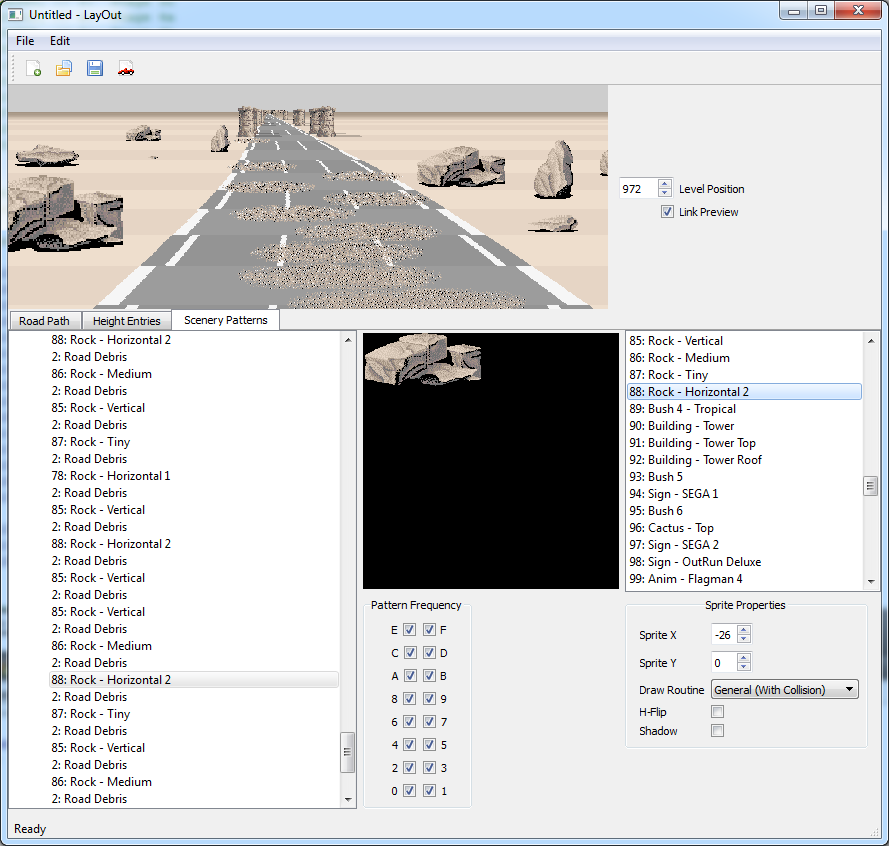
Switching to the scenery tab, you are immediately linked to the segment selected in the 2D view. There is a lot of complexity here, and I haven't even finished work on this part of the editor. The list on the left represents the segment and shows the list of items used in this section. Here you can see items including, rocks, road debris and so forth. The timing at which this list is rendered is affected by the pattern frequency. The engine can render two sprites per road position. Although it's possible to create the illusion of more. For example, on the Gateway stage the top beam is actually positioned behind the pillars. Or you can adjust the y values in some cases. 

Clicking an item in this list invokes object specific properties on the right hand side. In this case, you can edit the x and y position, select whether to horizontally flip the sprite, whether the object has a shadow and the custom draw routine used. Changing these properties only affects a single entry of the item in the segment. All of this is of course based on how the original OutRun engine works. 

Where we deviate from how the original engine works is with the new preview window. The preview window is cool because you can just say 'show me the track at position 704'. The original engine doesn't work like this; it must render the entire level from start to finish. If you were to hack the original game so that each level started at position 704, you would see something completely incorrect. Similarly, there is no easy way to reverse backwards through a track and this is now possible. The downside to this is that it adds complexity and possibly bugs where the rendering deviates. The upside in terms of previewing all changes in real-time is immense though. You can position the camera on the track, create a curve and watch the environment change in front of your eyes as you turn a dial. 

There's still a lot of work to do; it's a relatively complex project, which I guess is why no one has attempted it before. Additionally, I haven't done a lot of GUI based application development before, so I'm learning as I go.

CannonBall

Neil from the OutRun and Space Harrier Replicas project has kindly made this rather stunning logo for CannonBall. 


For now, it's only featured on the CannonBall page, but I will incorporate it into the build itself in future. I do plan to get back to CannonBall and add hardware rendering and other new features when LayOut is released.

I also moved the standard CannonBall download page to a new cleaner page on github. The old blog page was full of dated comments and somewhat messy. 

Monday, April 22, 2013

LayOut - WIP Video

Here's a quick video showing the latest progress with LayOut. You will want to view this full-screen to see the detail and turn the quality level up. As a bonus, there's some dodgy narration from myself, so turn the sound on. 

Current Features:
  • Edit Road path, width and height.
  • Import existing OutRun levels for editing and refinement. 
  • Export to Cannonball. Levels are fully playable.

I'm quite pleased with the ability to import existing levels. The import function generates the entire track path using nothing but the Curve Info value and direction that was discussed in a previous blogpost. So the large amount of data specifying the x,y of each road segment is completely redundant.

As you can see from the video, creating a playable level literally takes minutes. However, for the final release it will be important to quickly edit/preview sections of each level. I will be making additional changes to Cannonball to support that.

I must stress this is very much a work in progress; it's ugly, but it works!

Friday, April 12, 2013

Height Map Hell

One of the more complex areas of road data is the way in which setting the road height is handled. Each OutRun stage has 1948 positions that correspond to the path the level takes. We previously saw how a series of tables reference these positions to control aspects like the road width. This same table is also used to configure the height.

One of the entries in the table denotes whether the entry relates to a width change or a height change. Height changes are more complex than width changes. Each height change points to an entry in a separate table of 225 height maps.

So for example, on Coconut Beach at road position 1 the table references height map 211. In the diagram below, taken from my recent work on LayOut, you can see the data contained in this segment and a crude visualisation of the height map on the right.


The interesting thing is exactly how these maps correspond to a position in the level. We know when they are applied and therefore the start position of each height section, but how long do they last for? If the above map starts at road position 1, where does it end? 

The answer is relatively complex, as the height data you can see in the above table varies in length depending on the step adjust and multiplier values. Changing these values can either compress or expand the duration of the same height map. The road data isn't fixed to a particular road position increment. In fact in this example, changes in height are parsed through different multipliers to the straight sections and the end result would look something like this, presuming a start of road position 0. 


So here you can see the length of each data section in this single map and the road position it corresponds to at the bottom. I won't delve into the algorithms that map this data here, as it will probably confuse matters. I haven't yet visualized this in the editor itself. But we're starting to understand how these values correspond to a particular road position. 

Think of the actual values (0, 576 and -576) as the angle or steepness of the height section. And then the length pretty much specifies how high or how long that section of slope lasts for. 

To make things more complex there are four distinct types of height map in OutRun. Each type is rendered with a completely separate customized routine executed by the sub CPU that handles the road layer. Type 1 is the most common and shown above. 

Type 2 is more simple and used to create very long hills. It pretty much sets an angle and specifies a length or delay value. This is used at the point of the sharp chicane in Coconut Beach.


Now with Type 2, actually mapping this accurately to the road position gets interesting. Due to some quirks in the game code, the length of these sections actually depend on how fast you're driving. OK, you're not really going to notice this at normal speeds. But if you drive slowly, you can exploit a bug that pretty much elongates these sections way beyond where they should be. 


Here we are elongating the climb at the end of the Chicane. I'm driving slowly, and admittedly I've frozen the game timer. If we drive slow enough the hill can pretty much last right through to the end of the level:


OK, this is slightly silly stuff. But the point is that there is not a direct mapping between level position and the height map data. It's rather loose. So creating an editor where we can definitely say "the hill definitely ends here" or "this peak is exactly in line with this sign" simply isn't possible. The game code doesn't work in that way and there will always be ambiguity in some cases.  

Type 3 is a combination of Type 1 and Type 2. It's essentially some normal height data with a delayed section in the middle. The length of the section is handled differently again but is hard coded this time. Quite why, I don't really know. Typically a height entry will correspond to 8 road positions. This section isn't commonly used. 

Type 4 performs horizon y position changes. This can be seen at the start of Gateway, when the horizons level is raised. The only data attached to these entries is the new horizon position and the speed at which the change should happen.

It should be pointed out that the original assembler for this area of the game is horrendous and mildy terrifying.Therefore nailing all this detail down took a while, and unfortunately came at a time when things have been pretty busy for me. So apologies for the lack of exciting updates lately. 

In addition to this, I needed to expand my QT knowledge significantly to visualize this effectively in the LayOut editor. I implemented the ability to import the existing OutRun height map into the editor and display it in a logical tree format. 

There is still more work to be done, including basics like editing and creating new height map entries, although for a casual user, the existing maps should suffice. Once this is done, it will be time to move onto the fun stuff - adding level objects!

On Cannonball, a couple of people have kindly submitted changes that I will look into including in the future. The first is some control improvements from James and there is also some initial OpenGL rendering work from Legooolas, which will enable faster screen stretching/resizing than the current software approach. I'm holding off on Cannonball work for now and the next release is likely to be in conjunction with LayOut. 

Monday, March 18, 2013

More Data Hacking...

Although LayOut will handle the obvious visual mechanics of creating an OutRun track, things don't and can't stop there. In fact, OutRun's engine utilises an additional lookup table of pre-calculated values, required by the car physics and attract mode AI code.

This table, stored in the master CPU code, corresponds to the road path data, stored in the slave CPU code. Here is how three typical segments of road might be represented:


This means that at position 161, there's a left bend with property '121', until we reach the straight at position 277. This straight lasts until we reach the right curve at road position 359. This data is stored for every single curve and straight in every track in the game. 

Note, that this table does not define the path of the track at all from a visual point of view; this is purely used by the game's logic. If we get this stuff wrong, the car behaviour won't feel right when cornering. The value is used to adjust both the x position of the Ferrari as it enters a bend and to adjust your speed when you move through the corner. Without this, it would feel as if you drifted around corners too quickly. 

Understanding this table is all very well, but the problem is how to reverse engineer a curve back into this magical 'curve info' value required by the engine. Without knowing this formula, the editor project would be doomed!

I spent a long time experimenting with different ideas, largely aided by Excel and a bit of trial and error. In the end the solution was this:

For each curve in the game, calculate the average of the distances between the points on that curve. Therefore, you can use the standard distance formula for every pair of points:

Once you have the average distance between the points on a curve, you can do:

Curve Info = (1 / AverageDistance) * 4096

Where 4096 represents a 'one' in fixed point format. And finally we can spit out a curve info value in the format required by the game engine. 

Hopefully this gives you an idea of some of the less visually interesting work that I'm doing. 

Saturday, March 16, 2013

Road Width Editing

Road width editing is complete and working. Technically what you edit is the degree of separation between the two roads. The hardware overlaps the two roads, creating the illusion of one wide road. 

Therefore, it's nice and easy to split and rejoin the road into two lanes. 


Not the most exciting thing to look at, at the moment. But you see where this is going. Next on the list is height editing I reckon... 

Saturday, March 09, 2013

Road Path Implementation Complete

Following those exciting Excel spreadsheets and a little ranting, I'm pleased to say road path editing is implemented and working.

Here's an initial screenshot showing the progress of LayOut, the OutRun level editor.


This is just the first small stage; changing the path of the road. It's really easy to layout a complete track; you can produce something usable in under a minute. You define a series of control points and LayOut produces the curves and straights for you. Internally, the editor uses its own format and then exports to the format required by OutRun. This makes it easier to manipulate the track than dealing with the raw data.

Cannonball will have a debug mode to render the output in conjunction with Layout, so you can use both tools together. For now, a lot of this is somewhat hard coded, but the concept is proven.


For now, the road width and objects are still read from the original level data. This will obviously change as we add these options to LayOut. Here you can see we've inserted a curve at the start of Coconut Beach.

Well done to Shawn LeBlanc for naming the editor. I was originally going to call it 'Last Wave', but this sounds more like a sound editing tool and if I ever get round to creating sound editing tools it might cause confusion.

The next step will be to add the ability to define the road width, which encompasses single and dual road support. 

Wednesday, March 06, 2013

Track Editor Plan

As you know, the focus over the next few months is a track editor for OutRun levels. This was always the plan once Cannonball became a reality; I first blogged about this long-term goal back in in 2009!

Cannonball will of course continue, but there's a shift in focus as the next exciting instalment begins. It will mean fewer blog updates whilst I get the project off the ground, until I have something interesting to talk about.

The plan for the initial release is as follows:
  • The editor will be a separate application from Cannonball.
  • The editor will be developed in C++ and QT. This will support a solid cross-platform GUI. 
  • The editor will use Cannonball to preview the final level in some kind of debug mode.
  • The editor will output to a format compatible with Cannonball, and the original OutRun hardware. So you could potentially play the best levels on original hardware.
  • The following features will be supported: Road path/direction, road width, road height, scenery & track debris placement, road palettes.

Future releases could include additions like:
  • Road texture editor.
  • Sprite editor.
  • Sprite palette editor.

I've made a start, I'm learning QT and progress is steady. Maybe you have an idea for a feature or even the name of the editor. If so, comment below!