Showing posts with label cannonball. Show all posts

Monday, March 15, 2021

CannonBall V0.31 - Maintenance Release


This release focuses on upgrading the libraries and compilation tools CannonBall uses, as I hadn't maintained the codebase in a number of years. Most of these changes will be invisible to most users. Right now, I'm trying to get the house in order as opposed to add lots of wild new features! :)

The most exciting news is the upcoming SmartyPi support, but until the hardware is released, that's kind of a mute point!

Changes:

[audio] Audio updates at the correct rate and resolves the longstanding issue with music and sound being very slightly 'off'

[roms] ROMs are now read by CRC 32 value. Filenames no longer matter - so long as they are present they can be renamed to anything.

[roms] Fixed expected Z80 rom file length

[controls] Start Button behaviour less 'sticky' and buggy

[controls] Analog axis for accelerate and brake can now be configured via the in-built menu system

[menu] Reduced delay when scrolling through menu with analog controls

[config] ROMs and save data can be relocated to separate locations

[bug fix] Time Trial mode no longer crashes if used as the first mode played

[timing] Code tries to use V-Sync for timing OR internal timing, as opposed to both at once

[source] SDL 2 used by default. SDL 1 removed from codebase. This appears to have fixed compatibility bugs for some people

[source] Added compatibility for upcoming SmartyPi hardware (Pi 4 based) to run on original arcade hardware

[source] A general clean-up in many areas

Thursday, August 30, 2018

CannonBall comes to the Nintendo Wii

CannonBall was recently ported to the Nintendo Wii by Wuerfel_21 of IRQ Interactive!

She writes, "You may ask why one would want to port to such an irrelevant system. The answer being the possibility of arcade-perfect 240p video output."

The port also runs at a full 60 fps and supports GameCube controllers.


The port and source code can be found here.

Monday, July 02, 2018

CannonBall Interview [OutRun Week on Scarflix!]

Youtube channel Scarflix are hosting a week of awesome OutRun related content!

There's even an interview with an awkward British guy, talking about CannonBall...


Also check out:

Top 5 Things You Didn't Know about OutRun

Tuesday, May 22, 2018

Play OutRun on the Nintendo Switch via CannonBall

CannonBall was recently ported to the Nintendo Switch console by Modern Vintage Gaming. Hoorah, OutRun everywhere! 

Github Repository here


Thursday, August 31, 2017

OutRun applied to super serious Machine Learning and ridiculous toy car!

Here are two recent innovative uses of the CannonBall engine. It's great to see it being used in some many different ways. Click on the links to read the technical details.


Saturday, January 02, 2016

CannonBall SDL 2 Code Changes

I haven't done any coding work on CannonBall lately. This isn't because the project is abandoned, or that I've lost interest as I still have plenty of ideas. It's simply a result of my limited amount of time and as such I've focused my attention elsewhere.

Having said that, Manuel Alfayate has made some critical backend changes which result in CannonBall performing really well on Linux based systems including the Raspberry Pi. Previously performance was stuck in low gear.

Firstly, he has ported CannonBall to SDL 2. The codebase previously used the ancient SDL 1.2 library. This results in accelerated, fullscreen, X-less mode for the Pi using SDL 2. To utilise this, you must build the sdl2 or sdl2gles cmake profiles.

Right now, SDL 1 is still included in the codebase and is the default for Windows, but it will be phased out the next time I release a new version. Right now , the main benefits will be for Linux based systems where you don't want to rely on an X-Windows GUI environment.

There is still optimization needed for the Pi 1 and Pi Zero. I'd like to look into this when I have some time. But once you're past the sluggish start line, you can achieve 60fps in widescreen mode. Not bad for a $5 machine.

Here's a video of the changes in action with the frame counter on display. A $5 OutRun PCB could closer than you might think...


I've merged his changes into the main codebase. 

Monday, December 22, 2014

The Ultimate Way To Play OutRun

The Force Dynamics team have ported CannonBall to run on their 401cr motion simulator. It's particularly cool to see the terrain data is used to adjust the height of the simulator! 

It's fantastic to see CannonBall running on everything from Android phones through to military grade hardware! Check out the video below. 


Tuesday, November 11, 2014

CannonBall 0.3 - Widescreen Tilemaps & Freeplay

This is a version of CannonBall I meant to release a while ago, but moving house and family commitments ended up causing me to sit on it for a while. I suspect there may be some new bugs as there was a gap between coding and release, so please report anything found.

I also spoke with Colin who is going to carry on with CannonBoard work soon. Behind the scenes a lot is done and ready to go from a software point of view.

Features:
- Widescreen tilemap support for music selection screen.


- Widescreen support for map screen. The sea on the left now extends further.


- Freeplay Mode (enabled in config.xml for now)

- Optional Timing Fixes (enabled in config.xml for now)

Android

Also of note is the following project, which is a port of CannonBall to Android phones, tablets and other devices. There are some bugs and suggestions I have for the author, but overall it runs nicely!


You will need to enable the installation of APK files from unknown sources in the Settings -> Security section of your device to use it.


The author has kindly released the source code, which is available here.

Cabinet Restoration

One benefit of moving is that I finally have space for my OutRun cabinet. It needs a lot of restoration work, so I will be devoting a lot of free time to this project in the coming months as well as supporting Colin with his CannonBoard work. I'll post some pictures once I get going.

Monday, July 14, 2014

Tile Editing

One of the problems with CannonBall feature development is that many of the remaining tasks are hard to achieve. Take the music selection screen for example; it's one of the parts of the game that isn't widescreen and remains letterboxed.

Now it would be easy to simply drop in a replacement graphic at this point and bypass the original code to display it. In fact many people have sent me such an image over the last couple of years in the hope I would do just that. But that's not really true to the ethos of what CannonBall is about. The real solution is to extend the original tilemap and use the tile layer to render the screen, rather than hack in a replacement.

Unfortunately, this approach needs a full tile editing tool, which is a rather complex way of achieving something that will look no different to the end user. Nevertheless, I'm writing such a tool so that tilemaps can be edited, new tiles created and the screen finally widened.


Currently I have the ability to import the music selection tilemap, edit tile data and edit tile maps. I'm in the process of creating the new tiles to extend the image to widescreen. As you can see above, the right hand side is relatively easy to extend and I'm just starting to tackle the more complex five columns on the left hand side. 

OutRun contains plenty of unused tiles, which can be replaced for this purpose. For example, the larger Space Harrier font exists in the tileset, which is of course unused. 

Now that tiles can be edited, I can also move on to create HUD graphics for the High / Low gear change, a MPH display and so forth. The next version of CannonBall will feature these improvements. 

UPDATE: And here is the final result in CannonBall. The observant among you will notice that I've based the new tilemap on the 3DS version. 


It was a lot of work for something that looks simple. One of the complications with the System 16 tilemap format is that bits have a shared usage, that I'd previously overlooked. After all, the complications of it don't really matter when simply rendering existing data. For example a typical word of the tilemap is configured as follows:

 MSB          LSB
 ---nnnnnnnnnnnnn Tile index (0-8191)
 ---ccccccc------ Palette (0-127)
 p--------------- Priority flag
 -??------------- Unused

As the index and palette share bits, this locks tiles to certain palettes dependent on their index. Therefore the previously identified unused tiles are not usable. Instead the new tiles end up being scattered through the tilemap from location 4096 onwards. I also had to create new palette entries to map to these tiles.

This explains why Sega games have tile duplication, where the same tiles appear multiple times in the graphic roms. It enables them to be used with multiple palettes. In practice I can't help but think it would have been simpler to double the tilemap memory, thus giving the palettes their own distinct bitrange and avoiding tile duplications. I guess this may have been a cost saving measure.

Monday, January 27, 2014

CannonBall 0.22a - Continuous Mode

This release features a number of new features, important fixes and other changes.

Features:
  • Continuous Mode
    Play all 15 stages sequentially. This mode features its own high-score table.
  • Ability to toggle the fixed audio rom in the settings menu. It should be named opr-10188.71f and be placed in the roms directory. The fixed rom can be generated using bspatch and the relevant patch file from the enhanced edition pack
  • Fixed split axis support. XBox 360 pads should now work.
    The FAQ has some basic configuration advice. Thanks to baritonomarchetto for donating the pad. Rumble will also be supported in the future, but it means I'll have to upgrade the project to SDL 2. So it's a little more work than might be expected.

Core Engine Fixes:

  • Fixed a vehicle sprite bug that affected the angle of certain traffic sprites. Info here
  • Fixed two audio bugs that caused traffic noise to stutter under some circumstances, or not play correctly.
  • Corrected the pitch of PCM samples, they were played too quickly before. 

Other Minor Enhancements:
  • Ability to use controllers on other ports. This is configured in config.xml.
  • Support for arcade cabinets with a separate switch for high and low gear. This can be enabled in the gear options. 
  • The High Score table can display longer times to support Continuous Mode.
  • Added two handy game modes to toggle between 'original arcade' and 'enhanced' presets.

Quite a lot of code ended up changing to support Continuous Mode, so let me know if I broke anything in the process. Feel free to discuss the release on the forum

Download it here.

Update: Fixed the reported crash in continuous mode. This was a nasty bug that only materialized on a single level, when the code was compiled in release mode. 

Tuesday, December 24, 2013

CannonBall 0.21 - New Views & Attract Mode

This is a minor update I've been working on for just a couple of days, but it contains some fun features. Get it here.

Viewpoints

The first is the ability to change the camera viewpoint. There are a choice of three views: original, in-car and overhead. You can use the shift key to toggle between them, although this can be redefined. You can toggle the view at any point during gameplay. 

Original View

Overhead View

In-Car View

The in-car view is rather experimental. As OutRun doesn't use a true 3D engine, it's not really possible to implement such a view correctly from a camera perspective. However, it's kind of fun to play with.  The overhead view probably makes the game easier, as you can see more of the upcoming road. 

Attract Mode

I then decided to recode the attract mode to show off the viewpoints.  Doing so also reminded me how awful the attract mode AI is. The existing AI works fine for the first stage, but after that tends to crash continually. Combined with the Best OutRunners overlay showing every 20 seconds or so, attract mode never really showed the game's full potential. So I recoded the attract mode AI too. 

Some of the improvements to the AI are as follows:
  • Better at driving tracks without crashing into scenery.
  • No weird car shaking/juddering when turning corners.
  • Reduced brake light flickering
  • Can drive any stage in the game competently.
  • Selects a true random route, rather than a pre-defined route (as a result of the above)
  • Can handle split tracks correctly.
  • Handles the road split better. 
The AI code I've written is a lot simpler than the original code. It works differently, by looking at a distant position of the road and then adjusting the steering to drive towards it. If it gets too close to the road edge, it brakes. 

It still crashes into scenery occasionally, but I think that's ok. The AI is ultimately a compromise between driving safe and racing aggressively. And you want to see a crash sequence sometimes, just not at every bend.

Some of the original code still makes no sense to me, and I'm pretty sure it became a case of saying "this sort of works, let's ship it" towards the end of the project. One example of this is that the original code actually brakes when passing traffic, even when that traffic is right on the other side of a 6-lane road. You can spot this during the first two curves. The new code takes into account the x and z position of the traffic before braking. 

My AI still has difficulty passing trucks, as these drive slower than other traffic. Actually fixing this would probably take a fair chunk of code and I wanted to keep things simple. Plus the original AI suffers from this problem too, although arguably worse. 

You can toggle between the original attract mode and my new version in the game engine options located within the settings menu. The original mode uses the old AI and the new mode uses my rewrite. The code is here, if this sort of thing interests you.  


Other New Options

I finally implemented the ability to preview the audio track during the music select screen. You can enable this setting in the sound menu. Thanks to James Pearce who also submitted a fix for this.

Finally, there's a FPS counter that can be enabled in config.xml too if desired.

Following on from this I need to decide what to work on next. Most of the easy pickings are now done. Stuff like ghost-racing, multiplayer and so forth would be great but also a lot of coding work. :)

Friday, July 26, 2013

CannonBall - Javascript Version

Yes, now you can play OutRun directly from a modern web browser at 60fps with sound and no plugins. 

You may remember that one of my goals was to bring OutRun to every modern platform and this takes us another step closer. Here's the Javascript version of CannonBall

It would be even more seamless if I could bundle the ROMs, but sadly you will have to provide these yourself for obvious reasons. 

It runs on mobile devices, although it's not playable yet due to a lack of controls. I recommend the Firefox Beta browser on Android. I can run the engine at 40fps on a Samsung Galaxy S3 phone, so 30fps mode works fine.

Technically, the core engine is converted from C++ using Emscripten, which is an amazing piece of technology. I also wrote a wrapper around the C++ engine in Javascript to handle timing and audio. Audio uses the new WebAudio API

It's clearly "very beta" at the moment. For example, full-screen mode works only in Firefox. Audio only works in Firefox Nightly and Chrome. Getting things running nicely has been a bit of a frustrating balancing act. 

The source code is currently forked and can be found here. It's quite hacky at the moment, as my main focus has been to simply get this running. 

Exactly how much I support this will depend on the level of interest. I want to get back to LayOut, amusing as this project was. You are welcome to embed it in your webpage if you provide a link back to my blog. 

Sunday, June 30, 2013

Cannonball 0.19 - OpenGL Rendering

I've updated Cannonball to support OpenGL rendering. This means:

  • Large performance improvement, especially when using full-screen mode. 
  • Scanlines can now be used in both full-screen and stretch modes.
  • Filtering can be toggled in the config.xml for a softer look, similar to MAME.

The old software renderer will still be supported, but is toggled at compile time by unsetting the OPENGL flag in your build.cmake file. 


There are a few other improvements rolled into this build:

  • A minor bug was fixed in the road rendering. This occasionally caused road pixels furthest into the horizon to be displayed at the wrong position.
  • In widescreen mode, sprite clipping is now correct, so sprites close to the camera aren't deactivated so aggressively. This is most noticeable on levels with wide grassy strips etc. 

I'd consider this build beta for now. Please try it out and let me know if you spot any problems. If I haven't broken anything along the way, I will update the main page. Then it's back to LayOut, which has been neglected a little lately.

Download here.
Marcus has also updated the Mac version here.

Thanks to Legooolas for having a stab at the OpenGL code originally. In the end I rewrote everything myself as I wanted to untangle the SDL rendering code from the native OutRun video code. So now the codebase is a little cleaner in this area. 

Monday, February 25, 2013

Track Format Solved!

Following on from yesterday's post, I resolved OutRun's track format. This means we can press ahead with creating the level editor.

Firstly, I plotted the raw track data points as an x,y scatter graph in Excel. As you can see, the x,y co-ordinates that comprise the track data form a perfect circle. This is a pretty big clue.


The track is stored as a series of 2D co-ordinates on the perimeter of a circle (radius 4096). So to create the first left turn in Coconut Beach, you can start at 0, 4096 and iterate anti-clockwise from this point. For example, the start of the left turn is represented as follows. 


To sharpen the turn, you essentially step through the circle perimeter faster. To create a turn in the opposite direction, you iterate through the circle in the opposite direction. To create a straight you can simply stop wherever you are in the circle and continually output the current coordinate. 

I'm curious to know whether this technique for path generation is a common one, and whether it has a name. 

Sunday, February 24, 2013

Maths Assistance Required

The next stage of the Cannonball project is to build track editing tools. This will take the form of an independent track editor (a cross platform GUI based desktop program), that works in conjunction with the Cannonball engine (to provide the rendering). The editor will output level data for both Cannonball and the original arcade machine. This work is likely to take a good few months, but should be pretty exciting.

In terms of the level data, much of its format is fully understood: sprite/object placement, changing the road width and height, road colour setup and even changing the road texture.

Where I need assistance is with the road path or direction. Whilst I can interpret Outrun's road data into an x position or (obviously) a screen co-ordinate for Cannonball, I do not fully understand how to reverse the Maths used. I need the formula that will enable a user to plot a road path in a level editor, and then convert back to the original format stored in the program code.

Unfortunately, my Maths skills are limited but I'm hopeful there's someone out there who can look at this and outline how we can produce the path format stored in rom. Maybe it's trivial. Maybe I should have taken Maths class past the age of 16. ;)

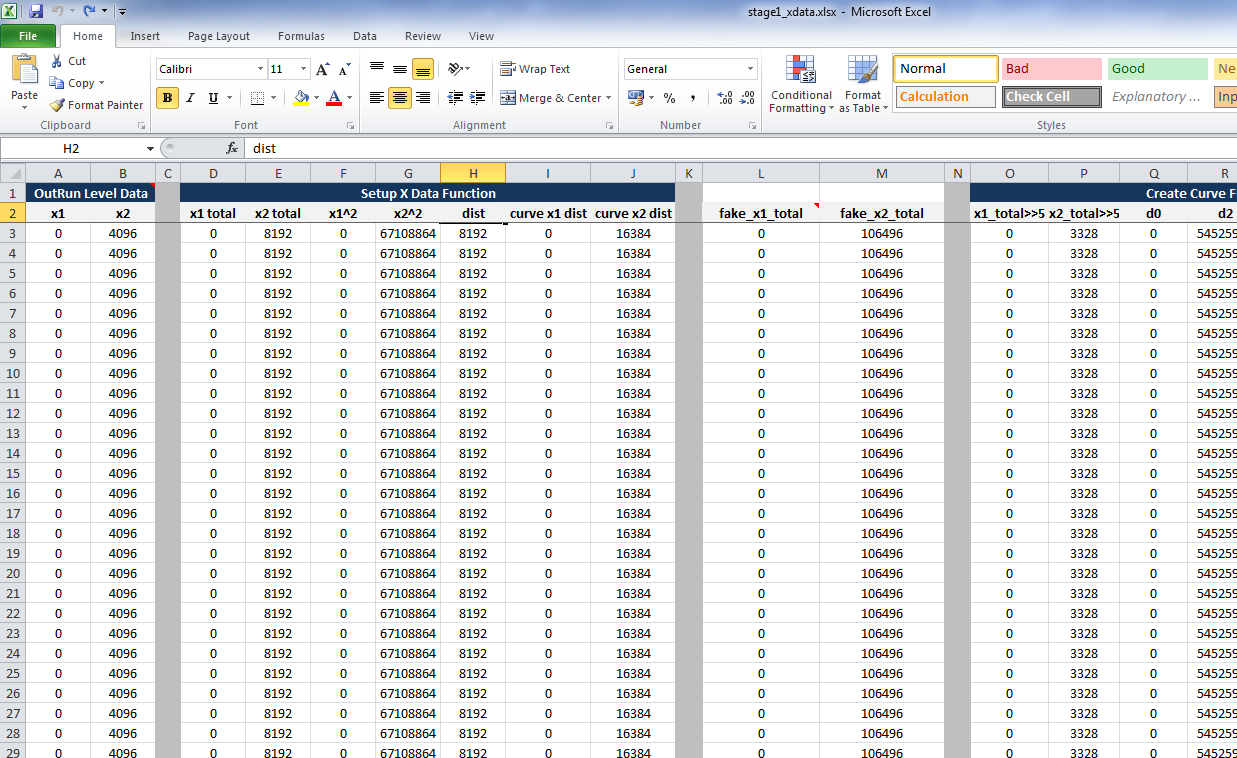
To simplify the problem, I've created an Excel spreadsheet. The spreadsheet uses as input the raw level data stored in the program code (Columns A & B). It runs it through a series of calculations (tab 1), similar to the program code, and outputs the path of the road as a line graph (tab 2).

Excel: More fun when rendering OutRun tracks. 

Below you can see we've output the path for Stage 1, Coconut Beach. It's rough because the spreadsheet makes some simplifications with rendering, due to its top down 2D approach rather than the pseudo-3D approach of the original game. 

Coconut Beach Track Path. Note the chicane at the end. 

As mentioned, the level data does not contain width, height, objects or anything else. Nor should we care about that. It's simply the road path.

The input columns are A & B. I'm pretty sure A relates to the road direction, and B somehow relates to the length of the direction. But I might be completely wrong.

On the third tab of the spreadsheet, is the C++ code that handles this data, which you can also refer to if you're a coder.

You can download the Excel spreadsheet here. I've also uploaded it to Google Docs here, but the formatting isn't as good. So work with the original if you can.

Update: This problem has now been solved.

Saturday, February 23, 2013

Cannonball 0.181 - Force Feedback

Cannonball now supports Force Feedback on Windows. Here's what's new:

  • Force Feedback Support (Windows Only). More details below. 
  • Controllers: Added support for steering dead zone.
  • Controllers: Added rudimentary support for split axis controllers.
  • Controllers: Able to navigate menus by turning wheel.
  • Controllers: Ability to select analog steering with digital pedals.
  • Controllers: No longer display H/L on screen when gear mode is set to cabinet. 
  • Bug: Fixed Prototype level not clearing.
  • Bug: Fixed score on completing game. The final score was incorrect.
  • Bug: Fixed bonus counter on completing game. (v0.181)
  • Bug: Reversed gear for cabinet play.
  • Build System: Added some changes supplied by user sairuk. 
Firstly, some background; the original OutRun arcade machines provide feedback in three ways:
  • The mini-upright offers the most basic feedback. During a crash, or when driving off-road, the end of the steering column is struck repeatedly. This causes the wheel to vibrate outwards in a crude manner.
  • The deluxe upright is somewhat more sophisticated. The steering assembly is mounted on a moveable layer. This layer, and therefore the steering column, is shifted left and right at varying speeds by a motor.
  • The deluxe sitdown is different yet again. The steering wheel is not connected to a motor mechanism at all. Instead, the entire unit rolls left and right based on your cornering speed, driving off-road and crashing.
On all machines, the wheel is centred by a pair of strong springs.
Cannonball ports the deluxe sitdown motor code. Instead of connecting it to a giant moving seat, the forces are channelled directly to the wheel. This results in both appropriate cornering forces and vibrations on impact. The codebase was not intended to be used in this way, so the results may not be perfect. And the benefits of force feedback will vary depending on your hardware and configuration options. Still, it works quite nicely for me, so please report how you get on. 
Setting up force feedback will require you to follow the instructions in the Cannonball manual here. You should also delete old config.xml files you may have, as the configuration has changed somewhat. 
For the technically minded, you can see the ported motor code here. And the DirectX interface code is here.  The reason for using DirectX is SDL does not yet support force feedback out of the box. I did try a patched version of SDL, but it proved to be more hassle than it was worth. So I simply ensured the DirectX code is omitted on non-Windows compiles. 
Next up, I'll probably resume work on level editing tools. I expect this part of the project to take a while, so there may not be as many regular updates. Many of the easy and quick wins are now complete.

Update: Fixed a bug reported in the bonus counter.

Saturday, January 26, 2013

Cannonball 0.17 - Analog Controls

The latest release of Cannonball finally supports analog controls. I've only tested with my Logitech Momo Racing wheel and pedals, so would be interested to get some feedback on how well it works for you, as your hardware may differ.

You can enable analog controls in the Settings -> Controls menu. You should also redefine the gamepad buttons accordingly for start/coin in etc.

There are a few advanced options you might need to edit in the config.xml file. These include which axis the steering and pedals are mapped to. You should be able to check this using the driver software provided with your wheel. Ensure that each control is configured to be on a separate axis in your driver software.

There is a further setting to denote how much of the turning circle of your wheel should be used. For example, I personally prefer tighter steering, so turning 50% left is in fact a hard left.

I will investigate force feedback at a later stage. I think the term force feedback is somewhat misleading though. OutRun didn't offer force feedback. The steering was centered by two large springs. A motor would essentially move the steering column when driving off-road or during a crash sequence creating a vibration effect.

The version of FinalBurn with force feedback actually uses the moving OutRun deluxe motor code to affect the wheel, so it's more akin to vibration. I can look to implement something similar in the future once I figure out the best approach; the stable release of SDL doesn't support this out of the box.

It's fun to finally be able to play with a proper racing setup. It makes some parts easier and some tougher. And we can finally claim that Cannonball is the ultimate version of OutRun.

Update: Also fixed a bug where time trial scores didn't initalize correctly from a new install. If you failed to record a best score in time trial mode previously, then this should be fixed!

Wednesday, January 23, 2013

Cannonball Future Plans

Things are going well with Cannonball. It's great to see some of you getting your hands dirty with ports! One of my original objectives was to bring the definite version of OutRun to every platform known to mankind. And we're slowly getting there ;)

I've added some brief information for those porting Cannonball on the following wiki page.

I plan to work on two features next. The first is analog control, including pedals. I picked up a Logitech MOMO Racing wheel cheaply on ebay. I just need to wait for an adapter plug to arrive in the post and then I can give it a spin.


Force Feedback support will probably arrive later, given that it's not in the current stable version of SDL. It's possible we can patch it in for some platforms though.

I'm also going to start work on an interactive track editor of sorts. This is likely to take me some time, so don't hold your breath on this (and I'll probably divert to working on the steering wheel stuff before). 

I like the idea of rendering the level as you will see it in the game, dynamically adjusting elements of it, and then being able to race it on the fly. 


click for full size version

I've started reimplementing the mode I had in the early tech demo, where you can step through a level and adjust the camera in order to facilitate this. Although now we have hi-res and widescreen as an added bonus. 

Sunday, January 20, 2013

Cannonball 0.16 - High Resolution Mode

This version adds what I am calling 'high resolution mode'. The standard game resolution is doubled. The sprites and road are rendered at a higher resolution where possible. If you look at the screenshot below, you'll notice that the road is more defined and the scenery less pixelated.


This mode isn't perfect. The high resolution road layer has mixed results. This is because the original code isn't fantastic to begin with. If you look at the screenshot below from MAME, you'll notice that the road lines aren't always rendered correctly. (OutRun issue, not a MAME bug just to be clear).


When running in high resolution mode, some of these problems become more noticeable. The optimal solution would be to rewrite the OutRun road code. But this would be a mammoth job!

The other thing to note is that OutRun uses five differently sized frames for each piece of scenery. 


The relevant frame is selected, and then scaled in hardware. In high resolution mode, we still want stuff that is in the distance to be more blurry or pixelated than the foreground. Therefore, for now, I haven't changed the actual frame that is initially selected, it's simply the scaling itself that benefits. The results are relatively nice and it's somewhat faithful as we're still using the original artwork.

You will need to enable high resolution mode in Settings -> Video. It's disabled by default. 

Other changes

You can now play the prototype Coconut Beach level. It can be enabled in the Settings -> Game Engine menu. This will swap out the standard Coconut Beach level. 

Lots of video options have been added to the Settings -> Video menu that were previously only available by manually editing the config.xml file. 

I've also made some changes to the build system to facilitate ports. 

Cannonball Mac OS X Port

Marcus Herbert has kindly ported Cannonball to OS X. Congrats! It currently runs on OSX Leopard, Snow Leopard, Lion and Mountain Lion.


Marcus writes "It currently is fluid on a Core i3 iMac (you get some stuttering at some place if you choose 60 fps)". You can grab it from here.

I'll work on getting his changes back into the main source tree in due course.