Here's a link to an interesting article outlining the choice between binary translation and emulation. It might help convey why I'm taking a radical approach in porting OutRun and not automating binary translation. As mentioned, binary translation certainly has its uses in producing code that can be hand optimised and altered. However, it ultimately results in code that is also unwieldy and in hard to decipher.
Even in cases where the original source code is available and can be translated by a tool, the results are often no better. I've worked with C code, automatically translated from 68k assembler, for a number of games during my days as a mobile developer. Often the output from such tools didn't resemble the target programming language in a meaningful manner.
Although decompiling and manually rewriting OutRun is a massive task, hopefully the end results will yield code that is understandable, portable and easy to enhance. By the end of the year, I will have completed the decompilation phase and commented an estimated tens of the thousands of lines of assembler. Maybe the end results will be superior to the original source code in areas. It's hard to say, as I don't have access to it!
One of the more gruelling aspects of the decompilation is the sheer amount of code. For example, I'm currently commenting code that controls the animation relating to smoke, dirt and other debris emitted from the Ferrari's wheels. The animation format and code to handle these routines differs yet again from all previous examples. I've lost count of how many animation formats the game contains.
One of the reasons the code is so bulky is that the programmers have seemingly reinvented the wheel for various aspects of the game. It wouldn't be difficult to code a generalised animation system, at the expense of a small amount of speed. As it is, many high-level features share little in terms of code or design despite relying on the same low-level routines. This results in a lot of code duplication.

Reassembler: Touching The Metal ..... Emulation, Decompilation, Hacking, Old Skool Gaming
Thursday, September 30, 2010


Wednesday, September 08, 2010
OutRun Unused Lap Time Code
There is a fair amount of unused code compiled into the OutRun ROMs. Much of it consists of redundant helper functions, that serve no interesting purpose.
I came across an unused routine today that's slightly more interesting. Firstly, OutRun stores the 'lap-time' of each stage you've completed - even though this information isn't really made use of (other than showing your previous lap-time on passing the checkpoint).
Either for debug purposes or as an unfinished feature the programmers included a routine to sequentially print these times during gameplay below the HUD.
Entering the following command in the mame debugger will print the lap-time for a particular stage you've already completed in a race.

I came across an unused routine today that's slightly more interesting. Firstly, OutRun stores the 'lap-time' of each stage you've completed - even though this information isn't really made use of (other than showing your previous lap-time on passing the checkpoint).
Either for debug purposes or as an unfinished feature the programmers included a routine to sequentially print these times during gameplay below the HUD.
Entering the following command in the mame debugger will print the lap-time for a particular stage you've already completed in a race.
d0 = x; pc = 7fea; g; [where x is the stage time to print]
Here's an example screen grab:

Here, I'm on Stage 3 and I've printed the lap-times for the previous two stages using the unused code routine. The lack of apostrophes in the additional lap print outs indicate that this idea was probably pulled at an early stage.
Code decompilation is progressing nicely. I'm on track to finish this year.
Monday, August 23, 2010
Animation Format
I've disassembled the code relating to the animation sequences displayed after you complete a route. There are five animation sequences dependent on the route you've taken. I'd hoped that the animation format would be similar to the code to handle the animation sequences during collision, for example the Ferrari rolling over. Unfortunately it was completely different.
If you're using the same revision of the ROMs as myself, you can trigger the sequences instantly in the MAME debugger with the following command:
Animation frames are stored in groups of 8 bytes, and formatted as follows:
+00 [Byte] Sprite Colour Palette
+01 [Byte] Bit 7: Make X Position Negative
Bits 4-6: Sprite To Sprite Priority
Bits 0-3: Top Bits Of Sprite Data Address
+02 [Word] Sprite Data Address
+04 [Byte] Sprite X Position
+05 [Byte] Sprite Y Position
+06 [Byte] Sprite To Road Priority
+07 [Byte] Bit 7: Set To Load Next Block Of Sprite Animation Data To 0x1E
Bit 6: Set For H-Flip
Bit 4:
Bits 0-3: Animation Frame Delay (Before Incrementing To Next Block Of 8 Bytes)
Each sprite (or object if you like) is assigned an address containing the animation sequence data. The animation terminates when bit 7 of byte 7 of a chunk is set. Two other animations use the same format at the start of the game - the map waving the start flag, and the Ferrari driving in from the side of the screen.
If you're using the same revision of the ROMs as myself, you can trigger the sequences instantly in the MAME debugger with the following command:
w@60be8 = x; pc = 9978; g [where x is the end sequence number 0-4]
Animation frames are stored in groups of 8 bytes, and formatted as follows:
+00 [Byte] Sprite Colour Palette
+01 [Byte] Bit 7: Make X Position Negative
Bits 4-6: Sprite To Sprite Priority
Bits 0-3: Top Bits Of Sprite Data Address
+02 [Word] Sprite Data Address
+04 [Byte] Sprite X Position
+05 [Byte] Sprite Y Position
+06 [Byte] Sprite To Road Priority
+07 [Byte] Bit 7: Set To Load Next Block Of Sprite Animation Data To 0x1E
Bit 6: Set For H-Flip
Bit 4:
Bits 0-3: Animation Frame Delay (Before Incrementing To Next Block Of 8 Bytes)
Each sprite (or object if you like) is assigned an address containing the animation sequence data. The animation terminates when bit 7 of byte 7 of a chunk is set. Two other animations use the same format at the start of the game - the map waving the start flag, and the Ferrari driving in from the side of the screen.
Saturday, July 17, 2010
Object Logic
The sun has been out, I changed jobs plus I'm getting married in a couple of months. These factors have conspired against me getting as much done lately.
Having said that, I've finished decompiling and understanding the routines that handle both the logic of in-game objects and their rendering behaviour. In plain English, the scenery that makes up the levels. There are 15 routines in total with a lot of code duplication between them. The level object structure contains a field that denotes which routine should be used.
One example is the checkpoint sign at the end of a stage. Each sign consists of two objects; the pillar of the sign and the header which reads "CHECK". Each part of the sign is drawn by a separate routine. The top of the checkpoint sign is drawn by a routine that also determines when the user has past the sign (to handle further game logic like loading the next stage). Whereas the base is handled by a similar routine that doesn't make this check. Additionally, there are two checkpoint signs at the end of each level and only one of them handles the check. Therefore, it cannot be assumed that because an object looks the same, it will always be handled by the same routine.
There is further complexity in these routines. Let's take the water strip sprites, seen on the left hand side of Coconut Beach (Stage 1) as an example. Each strip is processed by a custom routine that examines its screen z value. If the z value is particularly close to the screen, the sprite is simply zoomed. However, at distances stretching into the horizon the frame is completely changed as well as zooming being applied. There are alternate versions of this routine that swap frames based on the y value of the sprite. This variant is only used on one of the Stage 5 levels.
The palette changing logic for the countdown lights at the start of the game is also embedded as part of this logic. Some routines handle collision checking where necessary too. It's worth noting that I had to play all 15 levels just to understand where the routines were used. Simply looking at the code to figure out what was going on was impossible at times.
Moving on, I'm going to work sequentially through the rest of the decompiled program code. I'm at a stage now where a significant amount of work is complete so there are just gaps to fill in.
Having said that, I've finished decompiling and understanding the routines that handle both the logic of in-game objects and their rendering behaviour. In plain English, the scenery that makes up the levels. There are 15 routines in total with a lot of code duplication between them. The level object structure contains a field that denotes which routine should be used.
One example is the checkpoint sign at the end of a stage. Each sign consists of two objects; the pillar of the sign and the header which reads "CHECK". Each part of the sign is drawn by a separate routine. The top of the checkpoint sign is drawn by a routine that also determines when the user has past the sign (to handle further game logic like loading the next stage). Whereas the base is handled by a similar routine that doesn't make this check. Additionally, there are two checkpoint signs at the end of each level and only one of them handles the check. Therefore, it cannot be assumed that because an object looks the same, it will always be handled by the same routine.
There is further complexity in these routines. Let's take the water strip sprites, seen on the left hand side of Coconut Beach (Stage 1) as an example. Each strip is processed by a custom routine that examines its screen z value. If the z value is particularly close to the screen, the sprite is simply zoomed. However, at distances stretching into the horizon the frame is completely changed as well as zooming being applied. There are alternate versions of this routine that swap frames based on the y value of the sprite. This variant is only used on one of the Stage 5 levels.
The palette changing logic for the countdown lights at the start of the game is also embedded as part of this logic. Some routines handle collision checking where necessary too. It's worth noting that I had to play all 15 levels just to understand where the routines were used. Simply looking at the code to figure out what was going on was impossible at times.
Moving on, I'm going to work sequentially through the rest of the decompiled program code. I'm at a stage now where a significant amount of work is complete so there are just gaps to fill in.
Monday, June 14, 2010
Attract Mode Logic
The crash code is now complete, and it was more complex than I'd anticipated.
On the other hand, the logic to automatically control the player's car during Attract Mode is a lot simpler. The code can be quite basic, because the traffic in OutRun intelligently attempts to move out of your way. A simple detail most home conversions didn't pick up upon.
Here's a simplified pseudo-code conversion if you're interested:
On the other hand, the logic to automatically control the player's car during Attract Mode is a lot simpler. The code can be quite basic, because the traffic in OutRun intelligently attempts to move out of your way. A simple detail most home conversions didn't pick up upon.
Here's a simplified pseudo-code conversion if you're interested:
AttractModeAI()
{
  // Check upcoming road segment for straight/curve.
  // Choose route from pre defined table at road split.
  AICheckRoad();

  // Set steering value based on upcoming road segment
  AISetSteering();

  // If speed is below a certain amount, just accelerate
  if (car_speed < 0xFA)
  {
    accelerator = MAX_VALUE;
    return;
  }

  // If AI Traffic is close, set brake on
  if (traffic_close)
  {
    traffic_close = false;
    brake = 0xC0;
  }

  // If either wheel of the car is off-road
  else if (wheels_offroad)
  {
    brake = 0xC0;
  }

  // Upcoming road: Straight Road
  if (road_type == STRAIGHT)
  {
    curve_counter = 0;
  }

  // Upcoming road: Curved Road
  else
  {
    if (++curve_counter == 1)
    {
      // Set road curve value based on hard coded road data.
      // High value = Sharper Bend
      road_curve_value = value - 1;
    }
    // toggle brake on bends.
    // The brake flickers on/off in OutRun attract mode
    else if (road_curve_value != 0 && ((road_curve_value <= 0xA)
            || (road_curve_value & 8)))
    {
      brake = 0xA0;
      road_curve_value--;
      return;
    }
  }

  accelerator = MAX_VALUE;
  return;
}
Thursday, June 03, 2010
Collision
I'm currently working on disassembling the OutRun collision and crash handling code.
Once you start looking into the code in detail, you realise what an adventurous coding exercise OutRun is. I mean, how many ways do you need to crash in one game? Evidentally quite a lot... I can't quite fathom the level of detail they went into with regard to the collision routines. It's not sloppy coding as such, just simply attention to detail on an excessive scale. Sega must have had a supply of strong caffeine in the 80s.
Check out the graph I produced in IDA below of one of the main crash routines. This isn't even all of the collision and crash code, it's simply one function which can be toggled by the master jump table!

On a positive note, all the code blocks covered by the above graph are now decompiled and commented. On a negative note, mainly for my sanity, there are still more. Argh!
There are two main types of crash in OutRun: hitting traffic and hitting scenery. Hitting scenery can be broken down into three new types of crash depending on the speed your travelling at. There's the low speed bump, where the car rises in the air (using the same movement lookup table as the birds flying on the logo in attract mode fact fans), the medium speed spin and the full speed flip. Each of these has multiple internal states to contend with and each crash factors in aspects like your speed, road curvature, height, whether there's a further crash resulting from the first crash and a selection of passenger animations. For example just the lower speed crashes offer a choice of the woman hitting the man, the man scratching head & girl tapping car, the man scratching head & girl pointing or man looking subdued and girl pointing.
Also, whilst the object format of the crash routines bears some similarity to previous bits of code I decompiled, actually most of it is new. Plus the animation sequencing format seems to be different, though I figured that out too.
PS I'm going to bed!
Once you start looking into the code in detail, you realise what an adventurous coding exercise OutRun is. I mean, how many ways do you need to crash in one game? Evidentally quite a lot... I can't quite fathom the level of detail they went into with regard to the collision routines. It's not sloppy coding as such, just simply attention to detail on an excessive scale. Sega must have had a supply of strong caffeine in the 80s.
Check out the graph I produced in IDA below of one of the main crash routines. This isn't even all of the collision and crash code, it's simply one function which can be toggled by the master jump table!
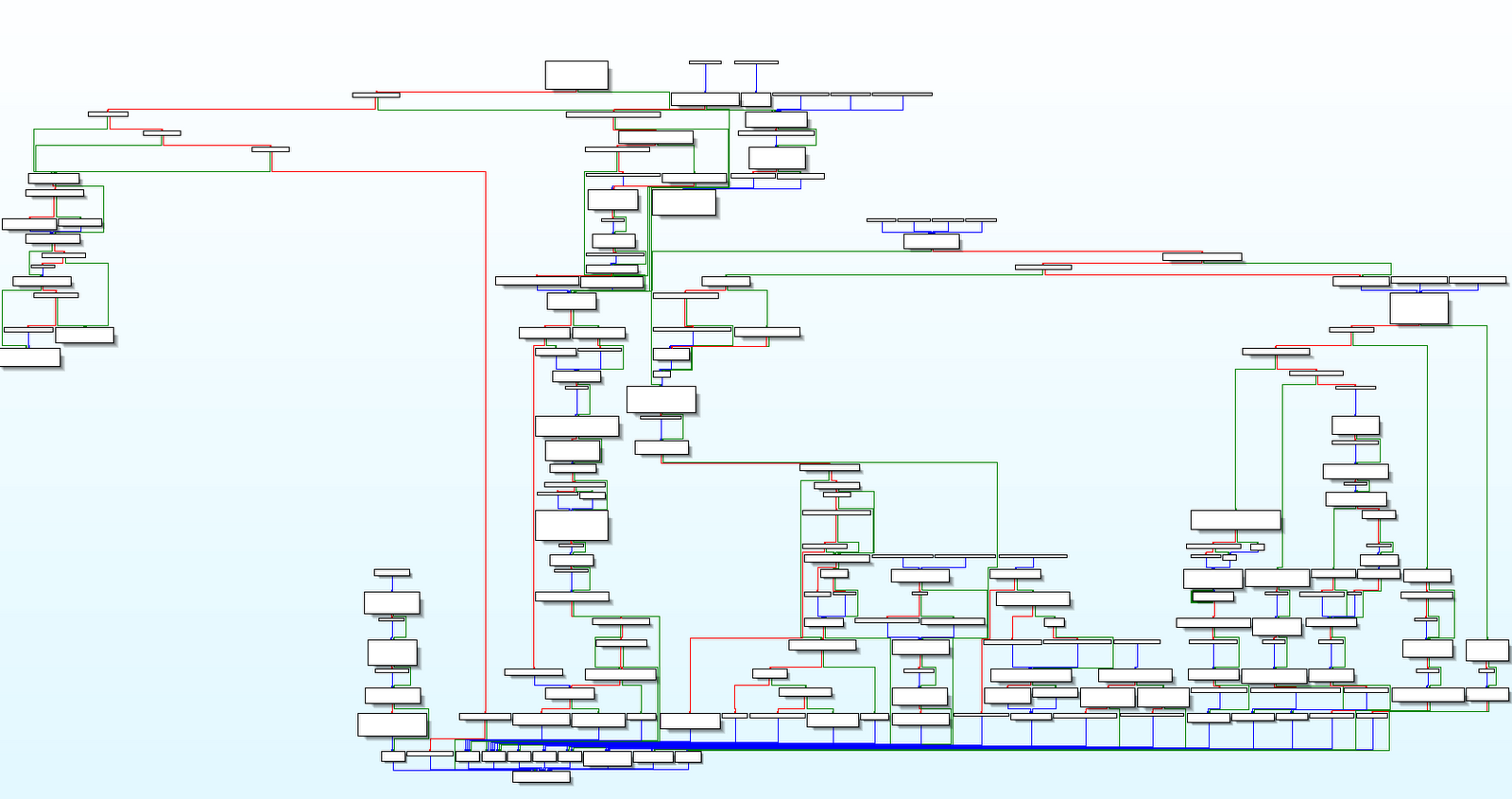
On a positive note, all the code blocks covered by the above graph are now decompiled and commented. On a negative note, mainly for my sanity, there are still more. Argh!
There are two main types of crash in OutRun: hitting traffic and hitting scenery. Hitting scenery can be broken down into three new types of crash depending on the speed your travelling at. There's the low speed bump, where the car rises in the air (using the same movement lookup table as the birds flying on the logo in attract mode fact fans), the medium speed spin and the full speed flip. Each of these has multiple internal states to contend with and each crash factors in aspects like your speed, road curvature, height, whether there's a further crash resulting from the first crash and a selection of passenger animations. For example just the lower speed crashes offer a choice of the woman hitting the man, the man scratching head & girl tapping car, the man scratching head & girl pointing or man looking subdued and girl pointing.
Also, whilst the object format of the crash routines bears some similarity to previous bits of code I decompiled, actually most of it is new. Plus the animation sequencing format seems to be different, though I figured that out too.
PS I'm going to bed!
Tuesday, May 18, 2010
An Interview With Alan Laird
Alan Laird worked on the Sinclair Spectrum and Amstrad CPC conversions of OutRun for Probe Software in 1988. Back in January 2000, I e-mailed him a series of questions about the conversion and he kindly took the time to answer.

I've answered your questions below, its been over 10 years so my memory is a little bit hazy in places.....
Firstly, how large was the team that worked on the Spectrum conversion, and how were the different tasks divided up?
Basically there were two people, Ian Morrison and myself. I've been out of touch with Ian for a number of years now so I don't know what he's doing.
Ian did most of the 3D engine code and I did everything else, but towards the end of the project I was pretty much the only person on the Spectrum version as Ian started working on the ST version.
We also did an Amstrad version based on the Spectrum code and John Bankier helped out with that.
How long did the conversion take?
Don't remember exactly. All I remember was that they wanted a Xmas release and the production house (Probe) got so paranoid about us running late that I ended up spending 2 weeks in their office in London. I think we got it done somewhere around early December after starting in the summer so about 4 or 5 months elapsed, this was whilst attending university, it was a rather stressful time.
Were you initially worried that the Spectrum would not be capable of replicating the original machine, and what were the main difficulties you encountered?
Yes, very worried, but it was too much of an opportunity to pass up. Clearly speed would be a difficulty, Outrun has a lot of graphics on screen so keeping the frame rate up whilst drawing those was difficult. Secondly because we didn't have fancy bitmap scaling hardware like the arcade machine, we had to store each graphic at a range of different sizes. There was a trade off between having enough sizes so that the game looked reasonably smooth and the storage space.
What hardware and software was used to convert the game?
It was developed on a PC based system called PDS that some other game developers had hacked together. This was a pretty decent Z80 assembler/debugger environment and at the time I think we used some flavour of 286 with initially a 10M hard drive. There was a dedicated comms board plugged into the Spectrum and an ISA card in the PC to form a kind of parallel interface between the two. You could squirt the entire assembled code down to the Spectrum in a fraction of a second. Much easier than the previous system using microdrives, multi-part assembles and the interface 1 network.
Were the graphics and sound written from scratch, or were some elements borrowed from the other conversions?
Outrun was really the third in an evolving series of driving games. First we did Nightmare Rally which was an original idea that Ian and I put together and then hawked around games houses before Ocean published it. Off the back of that we got a contract from Activision to convert Enduro Racer. This added the element of a track to the game. And off of that we got the Outrun contract from Probe. At each iteration the graphics engine become more sophisticated. Turbo and Europa were even better, they had much more flexibility in the 3D engine,infinitely variable curves and hills in the road and were getting decent frame rates as well. Sound code always came from third party specialists.


Did you see or work on any of the other conversions, and if so, how do you think they compared?
As mentioned above I had a hand in the Amstrad version and Ian worked on the ST and Amiga versions. Amstrad was always difficult because it had the same processor as the Spectrum but twice as much video memory to move around. Amstrad users also hated getting Spectrum rewrites since they didn't take full advantage of the graphics flexibility. We didn't have much time on the Outrun conversion but Turbo and Europa were pretty decent. The ST and Amiga, although they were 16 bit 68000, still weren't terribly fast pieces of hardware and expectations were much higher so invariably they disappointed.
.png)
How did you decide where to draw the line between graphical accuracy and speed? I ask this because the graphical accuracy on the game is outstanding, but one of the main criticisms at the time was that the speed suffered on certain stages.
There was a constant battle between me and the production house (Probe) over graphic density and speed. I wanted the game to look as realistic as possible and since I had full control over designing the course layouts I could put in lots of graphics to make it look good. Of course this brought the frame rate way down, I think it was averaging about 3fps in the end, but this game was never destined to be lightening fast.
A nerdy question: On the back of the OutRun packaging, the Spectrum screenshot is clearly different from the final game. The lorry is much larger and detailed, the sky is shaded differently, and the on-screen statistics are in different places. Why were these changes made, and does a copy of this early version still exist?
I think the graphic on the packaging was a mock up done by an artist so that it could get to the printers on time.
The large graphics were one of the first victims to storage space. We would generate a series of graphics at different scaling factors from full size down to almost nothing in steps of say 10%. What you find is that the largest graphics are only on screen for a fraction of a second as you zoom by something and they take up the most space, so naturally they got dropped pretty quickly. If we'd had the space they could have been left in since they are on screen for such a small amount of time they hardly affected speed.
The multi-loading system used on OutRun was rather complex, as it would load levels into memory as the game progressed, whilst holding as many as possible at one time. Was it developed specifically for OutRun?
Don't really remember too much about this aspect. I think the 48K version could hold about 4 levels at any one time including the most recently played level. So if you took the same route through the game each time you didn't need to reload but if you took a different route you would need to. Again it was down to the space needed by graphics, they just wouldn't all fit at the same time. We did +3 versions of the later games which made the whole thing a lot easier.
Did Turbo Outrun and / or Outrun Europa use the same engine as OutRun, or were they written from scratch?
As I mentioned, they were evolutions of the Outrun engine. By the last one the engine was actually getting quite good. Rendering speed was much faster both for the 3D landscape and the graphical objects. Not bad for such a primitive machine, remember that the Z80 didn't even have hardware multiply and divide operations so imagine how cumbersome doing 3D graphics was. We did everything in fixed precision arithmetic, 8 bit whole part, 8 bit fractional part and implemented multiply and divide using loops. For anything more complex like trig and log functions, we used pre-computed look up tables. Compare with today's Voodoo chipsets or a Dreamcast console, kids nowadays have it easy....
Can you briefly summarise the work that you have done since Spectrum programming?
I finished off my undergraduate degree (in Comp Sci) and then did a postgrad degree. After that I joined Baring Securities (of Nick Leeson fame) which later became ING Barings, working there for 5 years in London and mostly Tokyo. Now I'm with Merrill Lynch in Tokyo managing a development team doing real-time stock trading systems in C++. Ian set up his own games production house call ICE which did Turbo and Europa amongst others. Last I heard, which was about 6 or 7 years ago, he was headed to the States.
I lost interest in home computers for a long time and didn't really play games at all except for the odd arcade driving game until a couple of years ago when I got a couple of Voodoo cards for my work PC and discovered Quake. I've gotten right back into home computers now, although on a slightly different scale, with a network of Sun Sparcstations, a permanent internet connection and my own web sites. Its interesting to do a speed/memory/storage comparison of then and now. I started out with a 1K ZX81 and now I have 256M in my biggest machine, that's a quarter of a million times more memory amongst many other improvements. I still have all the old kit in my attic in London, maybe someday I'll dig it out and see if I can read those old microdrive catridges and floppy disks.
Hope this was interesting, it has been for me going back to those days and from all the interest on the web I see that the old games still live on. Thanks to everyone who's taken the time to collate information, build emulators and collect games.
Alan Laird - 2/1/2000.
Another article regarding the conversion can be found in the following issue of Sinclair User magazine from 1988:


I've answered your questions below, its been over 10 years so my memory is a little bit hazy in places.....
Firstly, how large was the team that worked on the Spectrum conversion, and how were the different tasks divided up?
Basically there were two people, Ian Morrison and myself. I've been out of touch with Ian for a number of years now so I don't know what he's doing.
Ian did most of the 3D engine code and I did everything else, but towards the end of the project I was pretty much the only person on the Spectrum version as Ian started working on the ST version.
We also did an Amstrad version based on the Spectrum code and John Bankier helped out with that.
How long did the conversion take?
Don't remember exactly. All I remember was that they wanted a Xmas release and the production house (Probe) got so paranoid about us running late that I ended up spending 2 weeks in their office in London. I think we got it done somewhere around early December after starting in the summer so about 4 or 5 months elapsed, this was whilst attending university, it was a rather stressful time.
Were you initially worried that the Spectrum would not be capable of replicating the original machine, and what were the main difficulties you encountered?
Yes, very worried, but it was too much of an opportunity to pass up. Clearly speed would be a difficulty, Outrun has a lot of graphics on screen so keeping the frame rate up whilst drawing those was difficult. Secondly because we didn't have fancy bitmap scaling hardware like the arcade machine, we had to store each graphic at a range of different sizes. There was a trade off between having enough sizes so that the game looked reasonably smooth and the storage space.
What hardware and software was used to convert the game?
It was developed on a PC based system called PDS that some other game developers had hacked together. This was a pretty decent Z80 assembler/debugger environment and at the time I think we used some flavour of 286 with initially a 10M hard drive. There was a dedicated comms board plugged into the Spectrum and an ISA card in the PC to form a kind of parallel interface between the two. You could squirt the entire assembled code down to the Spectrum in a fraction of a second. Much easier than the previous system using microdrives, multi-part assembles and the interface 1 network.
Were the graphics and sound written from scratch, or were some elements borrowed from the other conversions?
Outrun was really the third in an evolving series of driving games. First we did Nightmare Rally which was an original idea that Ian and I put together and then hawked around games houses before Ocean published it. Off the back of that we got a contract from Activision to convert Enduro Racer. This added the element of a track to the game. And off of that we got the Outrun contract from Probe. At each iteration the graphics engine become more sophisticated. Turbo and Europa were even better, they had much more flexibility in the 3D engine,infinitely variable curves and hills in the road and were getting decent frame rates as well. Sound code always came from third party specialists.

Nightmare Rally
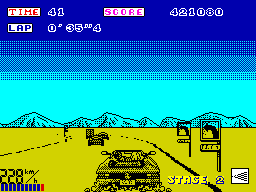
OutRun

Turbo OutRun
As mentioned above I had a hand in the Amstrad version and Ian worked on the ST and Amiga versions. Amstrad was always difficult because it had the same processor as the Spectrum but twice as much video memory to move around. Amstrad users also hated getting Spectrum rewrites since they didn't take full advantage of the graphics flexibility. We didn't have much time on the Outrun conversion but Turbo and Europa were pretty decent. The ST and Amiga, although they were 16 bit 68000, still weren't terribly fast pieces of hardware and expectations were much higher so invariably they disappointed.
.png)
Amstrad CPC Conversion
How did you decide where to draw the line between graphical accuracy and speed? I ask this because the graphical accuracy on the game is outstanding, but one of the main criticisms at the time was that the speed suffered on certain stages.
There was a constant battle between me and the production house (Probe) over graphic density and speed. I wanted the game to look as realistic as possible and since I had full control over designing the course layouts I could put in lots of graphics to make it look good. Of course this brought the frame rate way down, I think it was averaging about 3fps in the end, but this game was never destined to be lightening fast.
A nerdy question: On the back of the OutRun packaging, the Spectrum screenshot is clearly different from the final game. The lorry is much larger and detailed, the sky is shaded differently, and the on-screen statistics are in different places. Why were these changes made, and does a copy of this early version still exist?
I think the graphic on the packaging was a mock up done by an artist so that it could get to the printers on time.
The large graphics were one of the first victims to storage space. We would generate a series of graphics at different scaling factors from full size down to almost nothing in steps of say 10%. What you find is that the largest graphics are only on screen for a fraction of a second as you zoom by something and they take up the most space, so naturally they got dropped pretty quickly. If we'd had the space they could have been left in since they are on screen for such a small amount of time they hardly affected speed.
The multi-loading system used on OutRun was rather complex, as it would load levels into memory as the game progressed, whilst holding as many as possible at one time. Was it developed specifically for OutRun?
Don't really remember too much about this aspect. I think the 48K version could hold about 4 levels at any one time including the most recently played level. So if you took the same route through the game each time you didn't need to reload but if you took a different route you would need to. Again it was down to the space needed by graphics, they just wouldn't all fit at the same time. We did +3 versions of the later games which made the whole thing a lot easier.
Did Turbo Outrun and / or Outrun Europa use the same engine as OutRun, or were they written from scratch?
As I mentioned, they were evolutions of the Outrun engine. By the last one the engine was actually getting quite good. Rendering speed was much faster both for the 3D landscape and the graphical objects. Not bad for such a primitive machine, remember that the Z80 didn't even have hardware multiply and divide operations so imagine how cumbersome doing 3D graphics was. We did everything in fixed precision arithmetic, 8 bit whole part, 8 bit fractional part and implemented multiply and divide using loops. For anything more complex like trig and log functions, we used pre-computed look up tables. Compare with today's Voodoo chipsets or a Dreamcast console, kids nowadays have it easy....
Can you briefly summarise the work that you have done since Spectrum programming?
I finished off my undergraduate degree (in Comp Sci) and then did a postgrad degree. After that I joined Baring Securities (of Nick Leeson fame) which later became ING Barings, working there for 5 years in London and mostly Tokyo. Now I'm with Merrill Lynch in Tokyo managing a development team doing real-time stock trading systems in C++. Ian set up his own games production house call ICE which did Turbo and Europa amongst others. Last I heard, which was about 6 or 7 years ago, he was headed to the States.
I lost interest in home computers for a long time and didn't really play games at all except for the odd arcade driving game until a couple of years ago when I got a couple of Voodoo cards for my work PC and discovered Quake. I've gotten right back into home computers now, although on a slightly different scale, with a network of Sun Sparcstations, a permanent internet connection and my own web sites. Its interesting to do a speed/memory/storage comparison of then and now. I started out with a 1K ZX81 and now I have 256M in my biggest machine, that's a quarter of a million times more memory amongst many other improvements. I still have all the old kit in my attic in London, maybe someday I'll dig it out and see if I can read those old microdrive catridges and floppy disks.
Hope this was interesting, it has been for me going back to those days and from all the interest on the web I see that the old games still live on. Thanks to everyone who's taken the time to collate information, build emulators and collect games.
Alan Laird - 2/1/2000.
Another article regarding the conversion can be found in the following issue of Sinclair User magazine from 1988:

Subscribe to:
Posts (Atom)