Tuesday, January 14, 2014

CannonBoard Hardware Update

Colin Davies has been making solid progress on the CannonBoard project. This is the plug and play hardware interface that allows you to cleanly swap a modern PC into an original OutRun cabinet and run CannonBall.

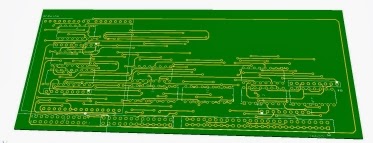
"The audio is now hooked up to the original connectors. There is also a power supply input and dummy experimental load resistors to keep the Outrun PSU happy as it requires a minimum load (about 1 amp / 5 watts). This is important to balance the 5v for reliability and for the rest of the electronics on board to function. It will be optional whether the board runs from the Outrun 5v or the Arduino 5v."

The analog inputs still need to be hooked up; you can see the I/O layout below.


Soon we'll be at a point where we can start running some tests with CannonBall.


Tuesday, December 24, 2013

CannonBall 0.21 - New Views & Attract Mode

This is a minor update I've been working on for just a couple of days, but it contains some fun features. Get it here.

Viewpoints

The first is the ability to change the camera viewpoint. There are a choice of three views: original, in-car and overhead. You can use the shift key to toggle between them, although this can be redefined. You can toggle the view at any point during gameplay. 

Original View

Overhead View

In-Car View

The in-car view is rather experimental. As OutRun doesn't use a true 3D engine, it's not really possible to implement such a view correctly from a camera perspective. However, it's kind of fun to play with.  The overhead view probably makes the game easier, as you can see more of the upcoming road. 

Attract Mode

I then decided to recode the attract mode to show off the viewpoints.  Doing so also reminded me how awful the attract mode AI is. The existing AI works fine for the first stage, but after that tends to crash continually. Combined with the Best OutRunners overlay showing every 20 seconds or so, attract mode never really showed the game's full potential. So I recoded the attract mode AI too. 

Some of the improvements to the AI are as follows:
  • Better at driving tracks without crashing into scenery.
  • No weird car shaking/juddering when turning corners.
  • Reduced brake light flickering
  • Can drive any stage in the game competently.
  • Selects a true random route, rather than a pre-defined route (as a result of the above)
  • Can handle split tracks correctly.
  • Handles the road split better. 
The AI code I've written is a lot simpler than the original code. It works differently, by looking at a distant position of the road and then adjusting the steering to drive towards it. If it gets too close to the road edge, it brakes. 

It still crashes into scenery occasionally, but I think that's ok. The AI is ultimately a compromise between driving safe and racing aggressively. And you want to see a crash sequence sometimes, just not at every bend.

Some of the original code still makes no sense to me, and I'm pretty sure it became a case of saying "this sort of works, let's ship it" towards the end of the project. One example of this is that the original code actually brakes when passing traffic, even when that traffic is right on the other side of a 6-lane road. You can spot this during the first two curves. The new code takes into account the x and z position of the traffic before braking. 

My AI still has difficulty passing trucks, as these drive slower than other traffic. Actually fixing this would probably take a fair chunk of code and I wanted to keep things simple. Plus the original AI suffers from this problem too, although arguably worse. 

You can toggle between the original attract mode and my new version in the game engine options located within the settings menu. The original mode uses the old AI and the new mode uses my rewrite. The code is here, if this sort of thing interests you.  


Other New Options

I finally implemented the ability to preview the audio track during the music select screen. You can enable this setting in the sound menu. Thanks to James Pearce who also submitted a fix for this.

Finally, there's a FPS counter that can be enabled in config.xml too if desired.

Following on from this I need to decide what to work on next. Most of the easy pickings are now done. Stuff like ghost-racing, multiplayer and so forth would be great but also a lot of coding work. :)

Tuesday, December 10, 2013

LayOut Open Pandora Port

Sebastian is working on a port of LayOut to the Pandora handheld. I didn't expect to see the editor ported to a handheld before anything else! Imagine, you'll be able to design and play OutRun levels whilst on the train to work. Here are some screenshots:


Grab it from here.

The forums were recently reset, so sadly a few posts were lost. They're back up and running now though. Be sure to checkout this cool CannonBall cabinet project from Mart, using an old Monaco GP cabinet he's salvaged from inevitable scrap!


Wednesday, November 27, 2013

CannonBoard

Colin Davies and myself are working on an exciting new project for owners of original OutRun cabinets: CannonBoard. 

The goal is to allow the original OutRun PCB to be cleanly replaced with a modern PC running CannonBall. There will be no soldering; no cable cutting and absolutely no cabinet butchery. Damaging original cabinets makes us very very sad. Simply unplug the cables from the PCB and connect to our interface. Restore your cabinet to the original PCB at any point. It's plug and play!

This approach has a number of advantages. You'll have 60 fps, a wealth of easily configurable options and the ability to play tracks from LayOut. Plus you can tinker with the CannonBall source code if you're technically minded. If this fills you with horror, you can turn all the options off to ensure your experience is identical to the original game whilst furiously sucking a Werther's original.

Colin is working on the hardware interface. A standard Windows, Mac or Linux machine will connect via USB to a cheap $10 Arduino board, mounted on a custom PCB. This custom PCB plugs into the cabinet controls.

Custom PCB


I'm working on the software side of things. CannonBall will communicate with the Arduino to receive inputs from the controls and output to the cabinet motors and lights. I've got the easy job, although I do need to port some more of the OutRun cabinet related code that I missed out. 
Arduino

We're aiming to support all cabinet models from the mini through to the deluxe sitdown. Like all good hobby projects, there is no strict schedule attached to the project. But progress so far is looking promising.

Tuesday, November 26, 2013

LayOut 0.11 - First Track & Source Code Release

Supper has created a track with LayOut and it plays quite nicely for a first attempt. You can try the track using the latest CannonBall from the command line:

cannonball -file test.bin (where test.bin is the name of the LayOut track to load) 
Head over to the forums to check it out.


I also released a new version of LayOut with some minor bug fixes for issues raised here. 

The source code has also been added to github here. I'll add some compilation instructions when I have time. Please note that for now I've only tested with MSVC 2010 and Qt 5.1, so it probably won't compile on other platforms out of the box yet. 

Sunday, November 17, 2013

Dynamite Dux: Easter Egg

Yes following the LayOut launch, I'm on a roll today. I'm not a big fan of Dynamite Dux, it's one of the weaker AM2 titles from the late 80s. However, knowing it was coded by Satoshi Mifune (aka Bin Chan), I knew there might be some goodies locked away waiting to be found.

This is one of the best AM2 extras I've found. It's an oldskool demo sequence with caricatures of the team.

To activate the sequence, you need to complete the game. On the Congratulations screen, hold player 2 start and press Player 1 start exactly 15 times.


I've uploaded a video of the complete sequence to youtube here.

LayOut 0.1: A Track Editor for OutRun

LayOut: A Track Editor For OutRun
It's finally here. Create your own OutRun tracks and edit the original ones.

Features:
  • Track Editing: Create your own OutRun tracks from scratch
  • Import: Edit original OutRun tracks and supporting data
  • Scenery Pattern editor
  • Height Pattern editor
  • Road, Sky & Ground Palette editing
  • Realtime Preview
  • Export and play tracks using CannonBall.
  • Export to original arcade ROMs coming soon.

Download LayOut here.

You will also need the latest version of CannonBall.
You will definitely need to read the manual. And I'd welcome input to make the manual clearer. 

New Forum:
There's a new forum here.
Hopefully this will be a more useful place to post tracks, report bugs and ask questions than the blog comments. Thanks to Steve (Tipus4u) for volunteering to set this up and provide the hosting.

What's Next? 
I'll focus on LayOut support and fixing the inevitable bugs that will be found. However, I need to take a break from LayOut in terms of implementing new features for a short period. I have an exciting hardware/software project planned that I'm working on with Colin from the Jamma+ forums. I'll post some details on that in due course.