Friday, September 20, 2013

OutRun Anniversary Update

It's the 27th anniversary of OutRun and we're long overdue a post about what I've been upto. Things may have seemed quiet, but that's only because I've been working intensely on LayOut behind the scenes. I say intensely, but as I'm married, 33 years old and have a full-time job in the games industry, finding spare time to program can be a luxury!

Excuses aside, yes, I thought I'd finish this project sooner. It would have been great to release LayOut for the anniversary. However, during development I came to the realisation that producing an editor people loved was more important to me than simply releasing a rushed product. And this is a hobby, so it's important that I love working on it myself.

Along the way, the feature set has ballooned beyond what I originally planned and LayOut, whilst imperfect in many ways, is greater than ever imagined. Let’s consider the features so far:


Realtime Level Preview
Full visualisation of the stage you are editing. All changes are shown in realtime. This uses a special widget that is an enhanced version of the core OutRun rendering engine from CannonBall.

Full Import of OutRun Data
Import and edit existing OutRun levels including unused/hidden levels.

Full road path editor
Define the path of the road, set the number of lanes and split the road into two.


Height Map Editor
Create 2D height maps, apply them to any section of road and preview your work in realtime. Every option is configurable, including options available in the original engine but not used by OutRun's levels.


Scenery Pattern Editor
Define your own scenery patterns. All options are configurable: shadows, sprite positioning, horizontal flipping, palettes, the internal engine draw/collision routine to use, repeat properties etc.


Palette Editor
Change the road, sky and ground colours. I will also implement sprite palette editing in the future so you can change the colours of everything in-game.


Level Mapping
Easily change the order of your levels, and map them to the 15 stages available in OutRun.

Multiple Export Options
Easily export to CannonBall. I'm simultaneously working on a new version of CannonBall to handle the exported level data. Shortly after release, I will work on an exporter that allows you to write directly to the original arcade ROM images. Yes, you'll be able to play your levels on arcade hardware.

Cross platform & Open Source
Coded using QT, the editor will function on Windows, Mac and Linux. The editor will be released under a similar non-commercial license to MAME.

Common questions I tend to get asked, that I will cover here:
1/ What about other games?
Whoooa one step at a time fella! Super Hang On uses a very similar track format so it wouldn't be inconceivable for me, or you, to add support in the future. But let's get OutRun to a good place first.

2/ What about sprite editing?
Yes definitely, in a future version. It's more complicated than you might think to do this properly.

3/ When will this be released?
I would expect November 2013 at the latest. Followed by a series of frantic updates.

I’m also thinking that we probably need to get a forum setup for discussion once the editor is released. Does anyone fancy hosting that?

Friday, July 26, 2013

CannonBall - Javascript Version

Yes, now you can play OutRun directly from a modern web browser at 60fps with sound and no plugins. 

You may remember that one of my goals was to bring OutRun to every modern platform and this takes us another step closer. Here's the Javascript version of CannonBall

It would be even more seamless if I could bundle the ROMs, but sadly you will have to provide these yourself for obvious reasons. 

It runs on mobile devices, although it's not playable yet due to a lack of controls. I recommend the Firefox Beta browser on Android. I can run the engine at 40fps on a Samsung Galaxy S3 phone, so 30fps mode works fine.

Technically, the core engine is converted from C++ using Emscripten, which is an amazing piece of technology. I also wrote a wrapper around the C++ engine in Javascript to handle timing and audio. Audio uses the new WebAudio API

It's clearly "very beta" at the moment. For example, full-screen mode works only in Firefox. Audio only works in Firefox Nightly and Chrome. Getting things running nicely has been a bit of a frustrating balancing act. 

The source code is currently forked and can be found here. It's quite hacky at the moment, as my main focus has been to simply get this running. 

Exactly how much I support this will depend on the level of interest. I want to get back to LayOut, amusing as this project was. You are welcome to embed it in your webpage if you provide a link back to my blog. 

Thursday, July 11, 2013

CannonBall in a Web Browser? (Updated!)

I've started converted CannonBall to Javascript so that it will run straight from a web browser with no plugins. I wanted to do this for a number of reasons:

  • It saves porting and means CannonBall will run on any every platform with a modern browser (e.g. tablets, phones etc.)
  • It's a good opportunity to show that CannonBall is pretty fast (some people doubt this). 
  • It will be pretty cool when LayOut is finished to be able to play a customised level by simply clicking a link. No download or messing around with files. 
  • It's interesting to me from a technical/tinkering perspective.
This might not be as painful as it sounds. I'm using emscripten which can convert C++ code to Javascript. (Technically it converts LLVM bitcode to Javascript, but you get the idea). And just to be clear, this version isn't intended to replace the downloadable CannonBall :)

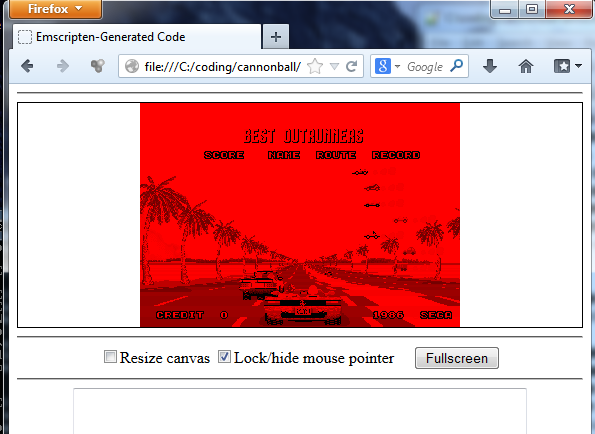
So far, progress isn't particularly exciting to observe:


But actually this is more promising than it may appear. The entire codebase compiles and begins to run. It's simply stumbling on finding the roms as I need to package them with emscripten's file system

So far the process I've followed to get things running was as follows:

1/ Followed the tutorial here for the Windows setup. 

I failed to get everything working from within Visual Studio 2010. Suspect this is an issue with a 32-bit VS 2010 process trying to spawn a 64-bit process as part of the toolchain. But actually fixing this issue proved problematic as I couldn't get clang to compile under Windows, so was unable to compile a 32-bit version to test this theory.

From reading some forum posts, it appears that using Windows 8 would probably solve this issue and the prebuilt clang would work.

2/ Switched to using a Unix/MinGW approach. Plugged the following platform file into CMake.  Ran mingw32-make; prior to this point the makefiles are butchered by CMake to work with Clang and emscripten instead of MinGW. 

3/ Created a customized emscripten.cmake file, which essentially doesn't do very much. 

4/ Fixed the three million compiler warnings reported by clang. It's a more fussy compiler than VS or GCC. I also removed the dependency on the boost library for now to speed up getting something working. 

5/ Converted the bytecode to a html page with embedded javascript using:
emcc cannonball.bc -o cannonball.html

6/ Loaded the file into a web browser. It fails in the way we would expect and spits out some sensible output about the roms. Hurrah!

Overall, it's only taken a couple of evenings to get this far. And most of this time was spent messing around installing stuff, and failing to get things working in Visual Studio. Once I hit upon the right approach, things went relatively smoothly. 

I'll carry on coding over the next few days. As Emscripten supports SDL libraries out of the box, it shouldn't be too tricky to get something working. But let's see... 

Edit: Couldn't resist implementing the file system before bed to see what happened. It kind of runs. But obviously not very well as there's a bunch of stuff I need to do like replace the main loop. Not sure on the colours for now, but probably an easy fix.


14th July: I fixed the colours, and it is now running and playable:


Unfortunately, it's using the software renderer for now. The OpenGL renderer would need a rewrite to make it WebGL compatible. It doesn't just work out of the box. 

The speed is reasonable at 30fps currently, although a little choppy in places. I'm not sure what kind of improvement I could expect if I rewrote the renderer...

If anyone is desperate to work on this further, I can check my work into git for them to mess around with. I may work further on this in the short-term or I may switch back to LayOut again!


I also tested on my Samsung Galaxy S3 phone. It runs pretty well on the Firefox Beta browser (maybe at around 20fps). There's no way to actually control the game though! It runs like a dog on Chrome.

15th July: I realised that using the emscripten_set_main_loop was causing the performance problems. Rewrote the main loop, so that the frame timing is done in pure JavaScript, with a call to the external C++ tick function. This is a similar approach to the port of Snes9x.

The results are outstanding. Unthrottled, the engine runs in widescreen at 80fps in Firefox on my desktop PC.

On my Samsung Galaxy S3, the engine now runs at a solid 30 fps in the Firefox browser (I haven't tried it unthrottled yet). Given that most elements of the game only update at 30fps in the original arcade game, this means you can run OutRun at full-speed. Pretty impressive for Javascript running in a phone's web browser!

24th July: After some experimentation, I now have relatively solid audio working on the PC. Unfortunately, directly porting the SDL audio code didn't lead to good results. Instead I replaced the SDL code with custom Javascript using the WebAudio API and an interface into the C++ code.

The results are decent on a fast enough PC with Chrome or Firefox Nightly.

Sunday, June 30, 2013

Cannonball 0.19 - OpenGL Rendering

I've updated Cannonball to support OpenGL rendering. This means:

  • Large performance improvement, especially when using full-screen mode. 
  • Scanlines can now be used in both full-screen and stretch modes.
  • Filtering can be toggled in the config.xml for a softer look, similar to MAME.

The old software renderer will still be supported, but is toggled at compile time by unsetting the OPENGL flag in your build.cmake file. 


There are a few other improvements rolled into this build:

  • A minor bug was fixed in the road rendering. This occasionally caused road pixels furthest into the horizon to be displayed at the wrong position.
  • In widescreen mode, sprite clipping is now correct, so sprites close to the camera aren't deactivated so aggressively. This is most noticeable on levels with wide grassy strips etc. 

I'd consider this build beta for now. Please try it out and let me know if you spot any problems. If I haven't broken anything along the way, I will update the main page. Then it's back to LayOut, which has been neglected a little lately.

Download here.
Marcus has also updated the Mac version here.

Thanks to Legooolas for having a stab at the OpenGL code originally. In the end I rewrote everything myself as I wanted to untangle the SDL rendering code from the native OutRun video code. So now the codebase is a little cleaner in this area. 

Thursday, May 23, 2013

Layout - Object Placement Video

I'm starting a new job soon, so there's likely to be a short break in proceedings. In the meantime, here's a video showing object placement and the new preview window. This makes using LayOut so much more fun.

Progress is a little slower than I would like, but hey, we've waiting 27 years for this so maybe it's not really an issue.

Thursday, May 16, 2013

LayOut: Preview Mode

Layout

Those of you who watched the previous LayOut video will have noticed one significant problem; whilst editing the track technically worked, the visualization of your actions leaved something to be desired.

As planned, I've moved on to editing sprite placement next. And in doing so, I incorporated a real-time preview of the changes you are making. If you create a new curve, hill or even change the placement of an object, this is updated in real-time. You can also change the camera angle by dragging in the preview window with the mouse.


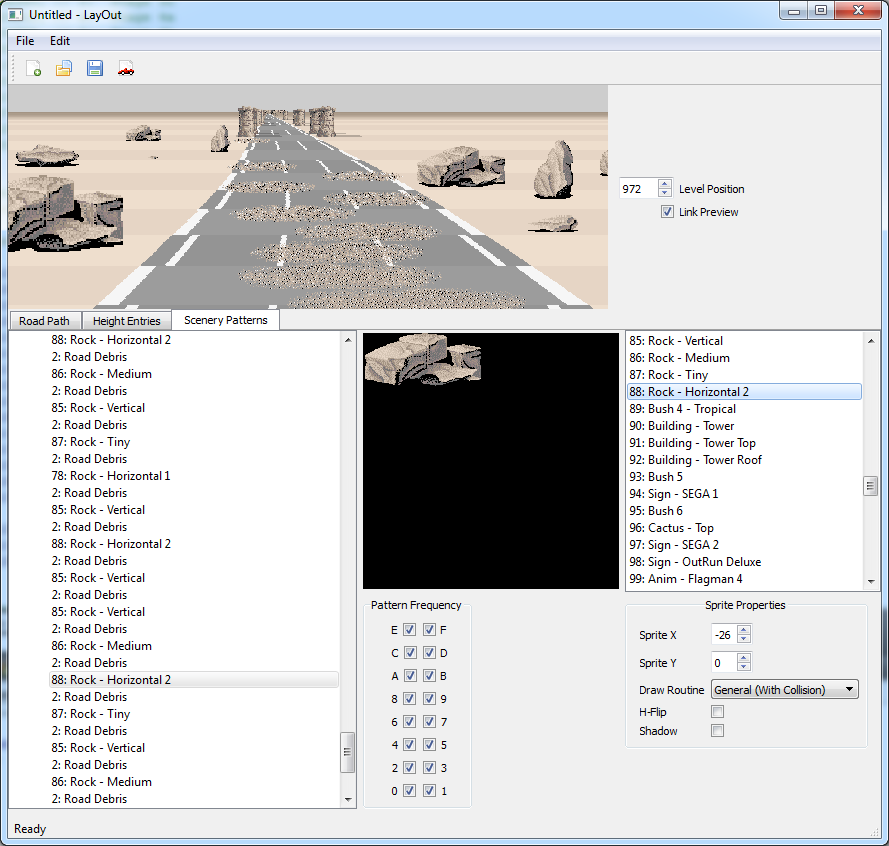
In this screenshot, I've imported the Devil's Canyon track. The 2D path is shown in the lower panel, and the actual rendering in the top panel. The panels can be linked so as you scroll through a level, the placement remains in sync. The 2D window is in scenery editing mode. The large dots indicate the start of a 'segment' of scenery items. Scenery in OutRun is segmented like this, so that patterns can be reused multiple times to save on storage space. Each time you use a segment, its length is variable. Segments wrap if the length exceeds the number of items in the segment.


Switching to the scenery tab, you are immediately linked to the segment selected in the 2D view. There is a lot of complexity here, and I haven't even finished work on this part of the editor. The list on the left represents the segment and shows the list of items used in this section. Here you can see items including, rocks, road debris and so forth. The timing at which this list is rendered is affected by the pattern frequency. The engine can render two sprites per road position. Although it's possible to create the illusion of more. For example, on the Gateway stage the top beam is actually positioned behind the pillars. Or you can adjust the y values in some cases. 

Clicking an item in this list invokes object specific properties on the right hand side. In this case, you can edit the x and y position, select whether to horizontally flip the sprite, whether the object has a shadow and the custom draw routine used. Changing these properties only affects a single entry of the item in the segment. All of this is of course based on how the original OutRun engine works. 

Where we deviate from how the original engine works is with the new preview window. The preview window is cool because you can just say 'show me the track at position 704'. The original engine doesn't work like this; it must render the entire level from start to finish. If you were to hack the original game so that each level started at position 704, you would see something completely incorrect. Similarly, there is no easy way to reverse backwards through a track and this is now possible. The downside to this is that it adds complexity and possibly bugs where the rendering deviates. The upside in terms of previewing all changes in real-time is immense though. You can position the camera on the track, create a curve and watch the environment change in front of your eyes as you turn a dial. 

There's still a lot of work to do; it's a relatively complex project, which I guess is why no one has attempted it before. Additionally, I haven't done a lot of GUI based application development before, so I'm learning as I go.

CannonBall

Neil from the OutRun and Space Harrier Replicas project has kindly made this rather stunning logo for CannonBall. 


For now, it's only featured on the CannonBall page, but I will incorporate it into the build itself in future. I do plan to get back to CannonBall and add hardware rendering and other new features when LayOut is released.

I also moved the standard CannonBall download page to a new cleaner page on github. The old blog page was full of dated comments and somewhat messy. 

Tuesday, April 23, 2013

Sprite Outtakes

You might think that after years of pulling OutRun apart I would have exhausted the hidden extras. Not quite yet! Here are a few unused sprites that are in the game.


Firstly, here's a motorbike that didn't make the final cut. The above is a mock-up to show what it would look like in-game. There is a preliminary data structure to hook the bike up in the game code, and that data structure is similar to the existing traffic entries so we can assume this was an early attempt to include other forms of traffic. However, the final higher level data structure is missing, which would include the palette information. So I've just used a random palette here.


Here's an extra frame from the end sequence with the genie. I guess there was originally concern that it wouldn't be clear who the genie was, so the extra frame on the left was made.


Finally here's another end sequence idea that was dropped. The existing sequence sees the guy kissed by the girl awarding the trophy, before flexing his muscles. It looks like the original plan was to also have him fall over. You can see the extra frames below:


You can use my quick and dirty sprite viewer to browse sprite data in other Sega titles.