Monday, March 18, 2013

More Data Hacking...

Although LayOut will handle the obvious visual mechanics of creating an OutRun track, things don't and can't stop there. In fact, OutRun's engine utilises an additional lookup table of pre-calculated values, required by the car physics and attract mode AI code.

This table, stored in the master CPU code, corresponds to the road path data, stored in the slave CPU code. Here is how three typical segments of road might be represented:


This means that at position 161, there's a left bend with property '121', until we reach the straight at position 277. This straight lasts until we reach the right curve at road position 359. This data is stored for every single curve and straight in every track in the game. 

Note, that this table does not define the path of the track at all from a visual point of view; this is purely used by the game's logic. If we get this stuff wrong, the car behaviour won't feel right when cornering. The value is used to adjust both the x position of the Ferrari as it enters a bend and to adjust your speed when you move through the corner. Without this, it would feel as if you drifted around corners too quickly. 

Understanding this table is all very well, but the problem is how to reverse engineer a curve back into this magical 'curve info' value required by the engine. Without knowing this formula, the editor project would be doomed!

I spent a long time experimenting with different ideas, largely aided by Excel and a bit of trial and error. In the end the solution was this:

For each curve in the game, calculate the average of the distances between the points on that curve. Therefore, you can use the standard distance formula for every pair of points:

Once you have the average distance between the points on a curve, you can do:

Curve Info = (1 / AverageDistance) * 4096

Where 4096 represents a 'one' in fixed point format. And finally we can spit out a curve info value in the format required by the game engine. 

Hopefully this gives you an idea of some of the less visually interesting work that I'm doing. 

Saturday, March 16, 2013

Road Width Editing

Road width editing is complete and working. Technically what you edit is the degree of separation between the two roads. The hardware overlaps the two roads, creating the illusion of one wide road. 

Therefore, it's nice and easy to split and rejoin the road into two lanes. 


Not the most exciting thing to look at, at the moment. But you see where this is going. Next on the list is height editing I reckon... 

Saturday, March 09, 2013

Road Path Implementation Complete

Following those exciting Excel spreadsheets and a little ranting, I'm pleased to say road path editing is implemented and working.

Here's an initial screenshot showing the progress of LayOut, the OutRun level editor.


This is just the first small stage; changing the path of the road. It's really easy to layout a complete track; you can produce something usable in under a minute. You define a series of control points and LayOut produces the curves and straights for you. Internally, the editor uses its own format and then exports to the format required by OutRun. This makes it easier to manipulate the track than dealing with the raw data.

Cannonball will have a debug mode to render the output in conjunction with Layout, so you can use both tools together. For now, a lot of this is somewhat hard coded, but the concept is proven.


For now, the road width and objects are still read from the original level data. This will obviously change as we add these options to LayOut. Here you can see we've inserted a curve at the start of Coconut Beach.

Well done to Shawn LeBlanc for naming the editor. I was originally going to call it 'Last Wave', but this sounds more like a sound editing tool and if I ever get round to creating sound editing tools it might cause confusion.

The next step will be to add the ability to define the road width, which encompasses single and dual road support. 

Wednesday, March 06, 2013

Track Editor Plan

As you know, the focus over the next few months is a track editor for OutRun levels. This was always the plan once Cannonball became a reality; I first blogged about this long-term goal back in in 2009!

Cannonball will of course continue, but there's a shift in focus as the next exciting instalment begins. It will mean fewer blog updates whilst I get the project off the ground, until I have something interesting to talk about.

The plan for the initial release is as follows:
  • The editor will be a separate application from Cannonball.
  • The editor will be developed in C++ and QT. This will support a solid cross-platform GUI. 
  • The editor will use Cannonball to preview the final level in some kind of debug mode.
  • The editor will output to a format compatible with Cannonball, and the original OutRun hardware. So you could potentially play the best levels on original hardware.
  • The following features will be supported: Road path/direction, road width, road height, scenery & track debris placement, road palettes.

Future releases could include additions like:
  • Road texture editor.
  • Sprite editor.
  • Sprite palette editor.

I've made a start, I'm learning QT and progress is steady. Maybe you have an idea for a feature or even the name of the editor. If so, comment below! 

Monday, February 25, 2013

Track Format Solved!

Following on from yesterday's post, I resolved OutRun's track format. This means we can press ahead with creating the level editor.

Firstly, I plotted the raw track data points as an x,y scatter graph in Excel. As you can see, the x,y co-ordinates that comprise the track data form a perfect circle. This is a pretty big clue.


The track is stored as a series of 2D co-ordinates on the perimeter of a circle (radius 4096). So to create the first left turn in Coconut Beach, you can start at 0, 4096 and iterate anti-clockwise from this point. For example, the start of the left turn is represented as follows. 


To sharpen the turn, you essentially step through the circle perimeter faster. To create a turn in the opposite direction, you iterate through the circle in the opposite direction. To create a straight you can simply stop wherever you are in the circle and continually output the current coordinate. 

I'm curious to know whether this technique for path generation is a common one, and whether it has a name. 

Sunday, February 24, 2013

Maths Assistance Required

The next stage of the Cannonball project is to build track editing tools. This will take the form of an independent track editor (a cross platform GUI based desktop program), that works in conjunction with the Cannonball engine (to provide the rendering). The editor will output level data for both Cannonball and the original arcade machine. This work is likely to take a good few months, but should be pretty exciting.

In terms of the level data, much of its format is fully understood: sprite/object placement, changing the road width and height, road colour setup and even changing the road texture.

Where I need assistance is with the road path or direction. Whilst I can interpret Outrun's road data into an x position or (obviously) a screen co-ordinate for Cannonball, I do not fully understand how to reverse the Maths used. I need the formula that will enable a user to plot a road path in a level editor, and then convert back to the original format stored in the program code.

Unfortunately, my Maths skills are limited but I'm hopeful there's someone out there who can look at this and outline how we can produce the path format stored in rom. Maybe it's trivial. Maybe I should have taken Maths class past the age of 16. ;)

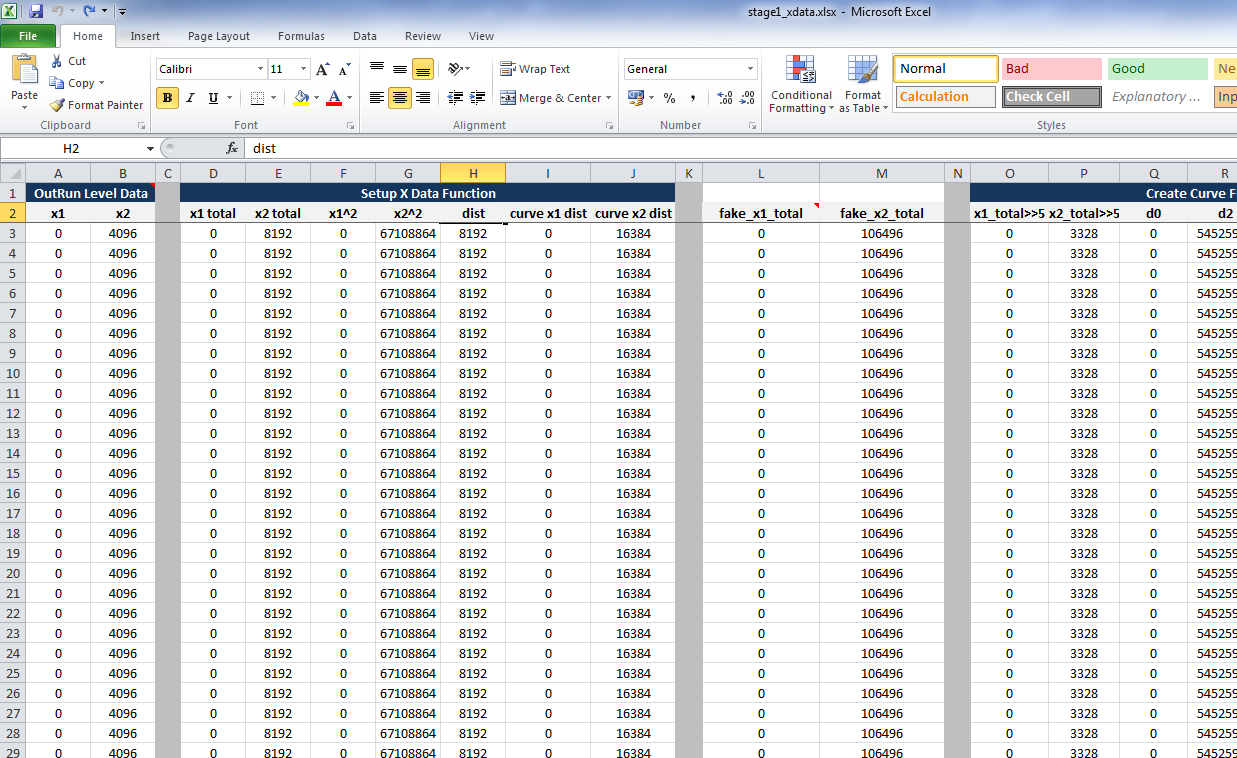
To simplify the problem, I've created an Excel spreadsheet. The spreadsheet uses as input the raw level data stored in the program code (Columns A & B). It runs it through a series of calculations (tab 1), similar to the program code, and outputs the path of the road as a line graph (tab 2).

Excel: More fun when rendering OutRun tracks. 

Below you can see we've output the path for Stage 1, Coconut Beach. It's rough because the spreadsheet makes some simplifications with rendering, due to its top down 2D approach rather than the pseudo-3D approach of the original game. 

Coconut Beach Track Path. Note the chicane at the end. 

As mentioned, the level data does not contain width, height, objects or anything else. Nor should we care about that. It's simply the road path.

The input columns are A & B. I'm pretty sure A relates to the road direction, and B somehow relates to the length of the direction. But I might be completely wrong.

On the third tab of the spreadsheet, is the C++ code that handles this data, which you can also refer to if you're a coder.

You can download the Excel spreadsheet here. I've also uploaded it to Google Docs here, but the formatting isn't as good. So work with the original if you can.

Update: This problem has now been solved.

Saturday, February 23, 2013

Cannonball 0.181 - Force Feedback

Cannonball now supports Force Feedback on Windows. Here's what's new:

  • Force Feedback Support (Windows Only). More details below. 
  • Controllers: Added support for steering dead zone.
  • Controllers: Added rudimentary support for split axis controllers.
  • Controllers: Able to navigate menus by turning wheel.
  • Controllers: Ability to select analog steering with digital pedals.
  • Controllers: No longer display H/L on screen when gear mode is set to cabinet. 
  • Bug: Fixed Prototype level not clearing.
  • Bug: Fixed score on completing game. The final score was incorrect.
  • Bug: Fixed bonus counter on completing game. (v0.181)
  • Bug: Reversed gear for cabinet play.
  • Build System: Added some changes supplied by user sairuk. 
Firstly, some background; the original OutRun arcade machines provide feedback in three ways:
  • The mini-upright offers the most basic feedback. During a crash, or when driving off-road, the end of the steering column is struck repeatedly. This causes the wheel to vibrate outwards in a crude manner.
  • The deluxe upright is somewhat more sophisticated. The steering assembly is mounted on a moveable layer. This layer, and therefore the steering column, is shifted left and right at varying speeds by a motor.
  • The deluxe sitdown is different yet again. The steering wheel is not connected to a motor mechanism at all. Instead, the entire unit rolls left and right based on your cornering speed, driving off-road and crashing.
On all machines, the wheel is centred by a pair of strong springs.
Cannonball ports the deluxe sitdown motor code. Instead of connecting it to a giant moving seat, the forces are channelled directly to the wheel. This results in both appropriate cornering forces and vibrations on impact. The codebase was not intended to be used in this way, so the results may not be perfect. And the benefits of force feedback will vary depending on your hardware and configuration options. Still, it works quite nicely for me, so please report how you get on. 
Setting up force feedback will require you to follow the instructions in the Cannonball manual here. You should also delete old config.xml files you may have, as the configuration has changed somewhat. 
For the technically minded, you can see the ported motor code here. And the DirectX interface code is here.  The reason for using DirectX is SDL does not yet support force feedback out of the box. I did try a patched version of SDL, but it proved to be more hassle than it was worth. So I simply ensured the DirectX code is omitted on non-Windows compiles. 
Next up, I'll probably resume work on level editing tools. I expect this part of the project to take a while, so there may not be as many regular updates. Many of the easy and quick wins are now complete.

Update: Fixed a bug reported in the bonus counter.